Don't miss your chance to take the Fabric Data Engineer (DP-600) exam for FREE! Find out how by attending the DP-600 session on April 23rd (pacific time), live or on-demand.
Learn moreNext up in the FabCon + SQLCon recap series: The roadmap for Microsoft SQL and Maximizing Developer experiences in Fabric. All sessions are available on-demand after the live show. Register now
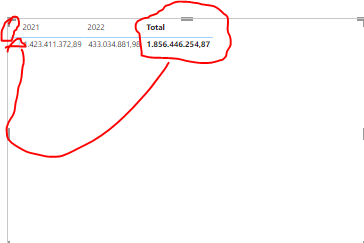
Hi I'm looking for a way to left align the totals column which by default power bi attached photo (In a table)
Solved! Go to Solution.
Hi @Anonymous ,
According to your description, there isn't a simple way to move the total column to the left now. However there is a workaround, instead of using automatic subtotals, you create "Total" rows in your data tables. Here's my solution.
Sample table:
1.Create a new table.
Table 2 =
VAR _total =
ROW ( "Year", " Total", "Value", SUM ( 'Table'[Value] ) )
RETURN
UNION ( 'Table', _total )
Result:
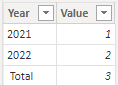
2. As we can see, I added one row at the end of my original data table, and give them “ Total” as the Year value. The blank character before the “Total” can make it become the first column in the Matrix because the columns in the Matrix of Power BI are sorted by the first character ascending.
3. Get the result.
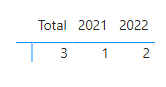
I attach my sample below for your reference.
Best Regards,
Community Support Team _ kalyj
If this post helps, then please consider Accept it as the solution to help the other members find it more quickly.
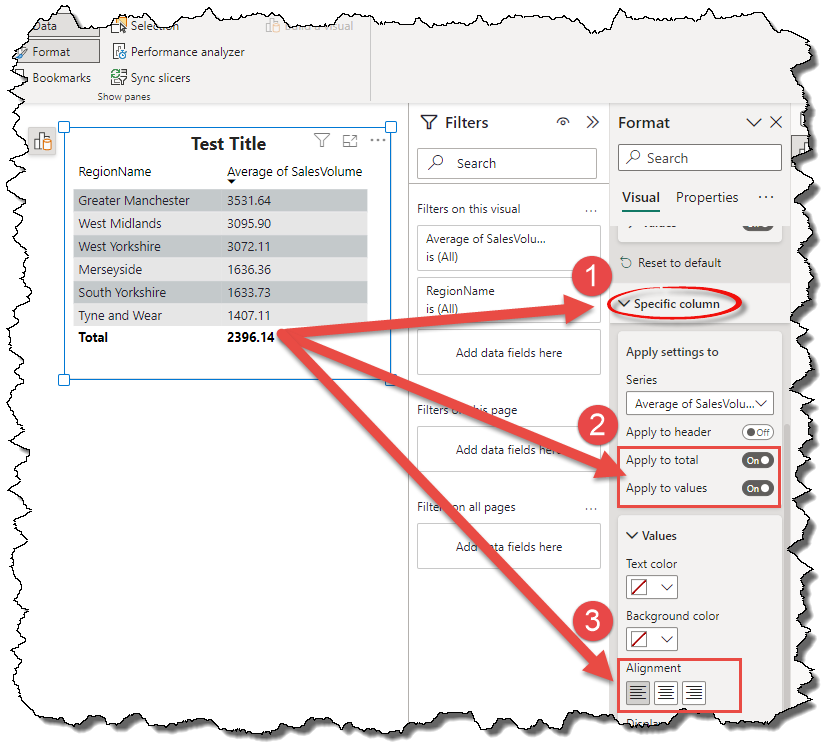
Found an easier way under:
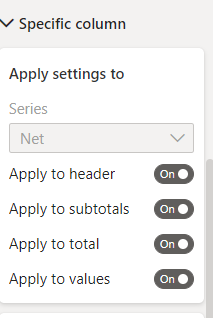
Format Pane > Specific Column
1) select Apply to total toggle
2) select Alignment > left
Align left totals
Hi @Anonymous ,
According to your description, there isn't a simple way to move the total column to the left now. However there is a workaround, instead of using automatic subtotals, you create "Total" rows in your data tables. Here's my solution.
Sample table:
1.Create a new table.
Table 2 =
VAR _total =
ROW ( "Year", " Total", "Value", SUM ( 'Table'[Value] ) )
RETURN
UNION ( 'Table', _total )
Result:
2. As we can see, I added one row at the end of my original data table, and give them “ Total” as the Year value. The blank character before the “Total” can make it become the first column in the Matrix because the columns in the Matrix of Power BI are sorted by the first character ascending.
3. Get the result.
I attach my sample below for your reference.
Best Regards,
Community Support Team _ kalyj
If this post helps, then please consider Accept it as the solution to help the other members find it more quickly.
If you have recently started exploring Fabric, we'd love to hear how it's going. Your feedback can help with product improvements.
A new Power BI DataViz World Championship is coming this June! Don't miss out on submitting your entry.
Share feedback directly with Fabric product managers, participate in targeted research studies and influence the Fabric roadmap.
| User | Count |
|---|---|
| 48 | |
| 45 | |
| 41 | |
| 20 | |
| 17 |
| User | Count |
|---|---|
| 69 | |
| 64 | |
| 32 | |
| 31 | |
| 27 |