cancel
Showing results for 
Search instead for 
Did you mean: 

Get Fabric Certified for FREE during Fabric Data Days. Don't miss your chance! Request now

Reply
erhan_79
Post Prodigy
Post Prodigy

How To Show Total Data İn Chart

Hi Dear All ;


i need your quick support about below issue .


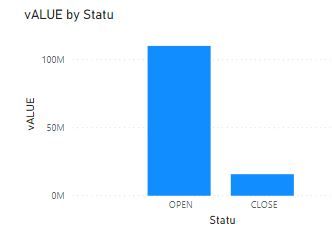
as you will see at the below chart i am giving an info "closed value bar " and "open value bar  " with stacked chart visiual  , you can imagine like that there is "statu " column which is in the visual on the axis section , and there is value column and i put this data to value section for stacked chart visiual .


i just wan that , is it possible to create one more bar to show "total value  bar " near them on the same visiual ,  i mean in the same chart there will be "all total value  bar" , "close value bar" , and "open value bar


thanks in advance for your kind supports


Capture.JPG


1 ACCEPTED SOLUTION
ryan_mayu
Super User
Super User

@erhan_79 

maybe you can try this workaround.

create a new table which contains all, open and close value.

create a measure

Measure = if(SELECTEDVALUE('Table (2)'[status])="open",sumx(FILTER('Table','Table'[status]="open"),'Table'[amount]),if(SELECTEDVALUE('Table (2)'[status])="close",sumx(FILTER('Table','Table'[status]="close"),'Table'[amount]),sum('Table'[amount])))

1.PNG


Did I answer your question? Mark my post as a solution!

Proud to be a Super User!


View solution in original post

1 REPLY 1
ryan_mayu
Super User
Super User

@erhan_79 

maybe you can try this workaround.

create a new table which contains all, open and close value.

create a measure

Measure = if(SELECTEDVALUE('Table (2)'[status])="open",sumx(FILTER('Table','Table'[status]="open"),'Table'[amount]),if(SELECTEDVALUE('Table (2)'[status])="close",sumx(FILTER('Table','Table'[status]="close"),'Table'[amount]),sum('Table'[amount])))

1.PNG


Did I answer your question? Mark my post as a solution!

Proud to be a Super User!


Helpful resources

Announcements
November Power BI Update Carousel

Power BI Monthly Update - November 2025

Check out the November 2025 Power BI update to learn about new features.

Fabric Data Days Carousel

Fabric Data Days

Advance your Data & AI career with 50 days of live learning, contests, hands-on challenges, study groups & certifications and more!

FabCon Atlanta 2026 carousel

FabCon Atlanta 2026

Join us at FabCon Atlanta, March 16-20, for the ultimate Fabric, Power BI, AI and SQL community-led event. Save $200 with code FABCOMM.

Top Solution Authors
Top Kudoed Authors