Join us at FabCon Atlanta from March 16 - 20, 2026, for the ultimate Fabric, Power BI, AI and SQL community-led event. Save $200 with code FABCOMM.
Register now!The Power BI Data Visualization World Championships is back! Get ahead of the game and start preparing now! Learn more
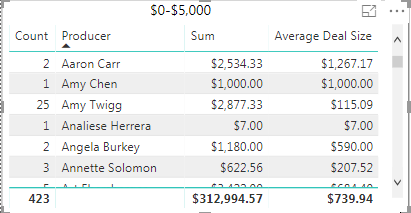
I have this table:
So on the far right column, I'm trying to get the average deal size based on the sum column. By default, PBI is taking $312,994.57 and dividing it by 423 (the number of times a person is in the table) which comes out to $739.94.
However, if I export this to an excel file and highlight the far right column from top to bottom, I get $1,158.40 as the average which would be the correct average. How can I get PBI to calculate it that way rather than just doing $312,994.57/423?
Solved! Go to Solution.
Can you try this? I think it shoud work
AVERAGEX(
Values( Table[Producer]), //be sure to change to the appropriate table [column]
[ Your Sum Measure Here]
)
Can you try this? I think it shoud work
AVERAGEX(
Values( Table[Producer]), //be sure to change to the appropriate table [column]
[ Your Sum Measure Here]
)
The Power BI Data Visualization World Championships is back! Get ahead of the game and start preparing now!
| User | Count |
|---|---|
| 41 | |
| 38 | |
| 36 | |
| 30 | |
| 28 |
| User | Count |
|---|---|
| 128 | |
| 88 | |
| 79 | |
| 67 | |
| 62 |