Join us at FabCon Atlanta from March 16 - 20, 2026, for the ultimate Fabric, Power BI, AI and SQL community-led event. Save $200 with code FABCOMM.
Register now!Vote for your favorite vizzies from the Power BI Dataviz World Championship submissions. Vote now!
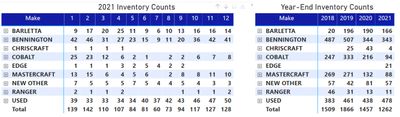
How do you show inventory counts at cut-off dates. For example, I want to show year-end trends, so I want to show 12/31 total and not the sum of all month-end counts? How do you accomplish this? For example, you can see how my year-end totals are skew in the below screen shot.
Solved! Go to Solution.
You can create measures and use Time intelligence functions to fidn the solution.
https://docs.microsoft.com/en-us/dax/time-intelligence-functions-dax
If this post helps, please consider accepting it as the solution to help the other members find it more quickly.
Appreciate your Kudos!!
LinkedIn: www.linkedin.com/in/vahid-dm/
Add your month column to the filter pane for that visual and set filter to only show the DEC or 12.
If this post helps, please consider accepting it as the solution to help the other members find it more quickly.
Appreciate your Kudos!!
LinkedIn: www.linkedin.com/in/vahid-dm/
Thank you. How would I do it for a quarterly presentation?
You can create measures and use Time intelligence functions to fidn the solution.
https://docs.microsoft.com/en-us/dax/time-intelligence-functions-dax
If this post helps, please consider accepting it as the solution to help the other members find it more quickly.
Appreciate your Kudos!!
LinkedIn: www.linkedin.com/in/vahid-dm/
Thank you Vahid. Much appreciated!!
Vote for your favorite vizzies from the Power BI World Championship submissions!
If you love stickers, then you will definitely want to check out our Community Sticker Challenge!
Check out the January 2026 Power BI update to learn about new features.
| User | Count |
|---|---|
| 56 | |
| 53 | |
| 40 | |
| 17 | |
| 16 |
| User | Count |
|---|---|
| 122 | |
| 108 | |
| 44 | |
| 32 | |
| 26 |