Join us in Barcelona for FabCon and SQLCon, September 28 - October 1, 2026.
This is best Fabric, Power BI, SQL and AI community event. How do we know? The last event sold out! Save €200 with code FABCMTY200.
Register now- Power BI forums
- Get Help with Power BI
- Desktop
- Service
- Report Server
- Power Query
- Mobile Apps
- Developer
- DAX Commands and Tips
- Custom Visuals Development Discussion
- Health and Life Sciences
- Power BI Spanish forums
- Translated Spanish Desktop
- Training and Consulting
- Instructor Led Training
- Dashboard in a Day for Women, by Women
- Galleries
- Data Stories Gallery
- Themes Gallery
- Contests Gallery
- QuickViz Gallery
- Quick Measures Gallery
- Visual Calculations Gallery
- Fabric Apps Gallery
- Notebook Gallery
- Translytical Task Flow Gallery
- TMDL Gallery
- R Script Showcase
- Webinars and Video Gallery
- Ideas
- Custom Visuals Ideas (read-only)
- Issues
- Issues
- Events
- Upcoming Events
The Fabric community is upgrading! Read all of the details including the timeline and what you can expect. Learn more
- Power BI forums
- Forums
- Get Help with Power BI
- Desktop
- How Include elements of Catalogos without value
- Subscribe to RSS Feed
- Mark Topic as New
- Mark Topic as Read
- Float this Topic for Current User
- Bookmark
- Subscribe
- Printer Friendly Page


- Mark as New
- Bookmark
- Subscribe
- Mute
- Subscribe to RSS Feed
- Permalink
- Report Inappropriate Content
How Include elements of Catalogos without value
Hi everyone, I have 4 tables , one is the fact table and 3 dimension catalogue (Company, Country and Accounts)
Each Country and Accounts belong to a specific Company, that is why the catalogue of Country and Accounts have a column of company.
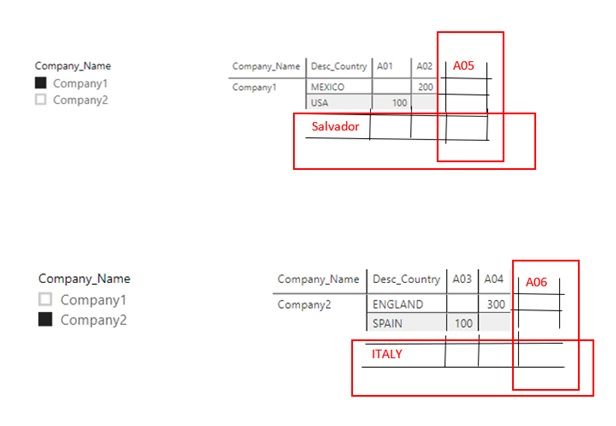
I need to show in the dashboard the total filter company, but at the same time bring the respective countries and accounts of the company (like the image).
This is the project without_value
Solved! Go to Solution.


- Mark as New
- Bookmark
- Subscribe
- Mute
- Subscribe to RSS Feed
- Permalink
- Report Inappropriate Content
@MiguelSaldana77 another one only by creating a table and you can get all your viz from here
 testtbl =
VAR _a1 =
    SELECTCOLUMNS (
        Country,
        "IdCountry", [IdCountry] + 0,
        "Desc_Country", [Desc_Country],
        "IdCompany", [IdCompany] + 0
    )
VAR _b1 =
    DISTINCT ( SELECTCOLUMNS ( Account, "ID_Account", [ID_Account] & "" ) )
VAR _c1 =
    CROSSJOIN ( _a1, _b1 )
VAR _d1 =
    SELECTCOLUMNS (
        Company,
        "IdCompany", [Id_Company] + 0,
        "Company_Name", [Company_Name]
    )
VAR _e1 =
    NATURALLEFTOUTERJOIN ( _c1, _d1 )
VAR _f1 =
    SELECTCOLUMNS (
        'Fact',
        "ID_Account", [ID_Account] & "",
        "IdCountry", [IdCountry] + 0,
        "Total", [Total]
    )
VAR _h1 =
    NATURALLEFTOUTERJOIN ( _e1, _f1 )
RETURN
    _h1
========================
Did I answer your question? Mark my post as a solution!
Proud to be a Super User
My Custom Visualization Projects
• Plotting Live Sound: Live Sound
• Beautiful News: Women in Parliament, Energy Mix, Shrinking Armies
• Visual Capitalist: Working Hrs
• Others: Easing Graph, Animated Calendar
MayViz Submissions
• Week 1: View
• Week 2: View
• Week 3: View
• Week 4: View
========================
- Mark as New
- Bookmark
- Subscribe
- Mute
- Subscribe to RSS Feed
- Permalink
- Report Inappropriate Content
I created 3 calculated columns as below
Company = RELATED(Company[Company_Name])
// Company has 1 to many relationship to Country

ID_Account = LOOKUPVALUE('Fact'[ID_Account],'Fact'[IdCountry],Country[IdCountry])

Sales =
IF (
    ISBLANK (
        LOOKUPVALUE (
            'Fact'[Total],
            'Fact'[ID_Account], Country[ID_Account],
            'Fact'[IdCountry], Country[IdCountry]
        )
    ),
    0,
    LOOKUPVALUE (
        'Fact'[Total],
        'Fact'[ID_Account], Country[ID_Account],
        'Fact'[IdCountry], Country[IdCountry]
    )
)
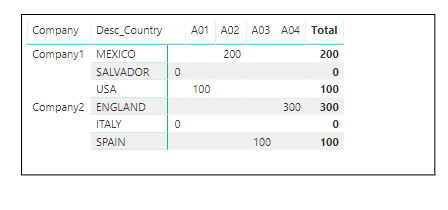
Now utilising everything from Country table I can get to to the view you desired
========================
Did I answer your question? Mark my post as a solution!
Proud to be a Super User
My Custom Visualization Projects
• Plotting Live Sound: Live Sound
• Beautiful News: Women in Parliament, Energy Mix, Shrinking Armies
• Visual Capitalist: Working Hrs
• Others: Easing Graph, Animated Calendar
MayViz Submissions
• Week 1: View
• Week 2: View
• Week 3: View
• Week 4: View
========================
- Mark as New
- Bookmark
- Subscribe
- Mute
- Subscribe to RSS Feed
- Permalink
- Report Inappropriate Content
Thanks @smpa01
I did something similar but we are missing the complete accounts by company
- Mark as New
- Bookmark
- Subscribe
- Mute
- Subscribe to RSS Feed
- Permalink
- Report Inappropriate Content
@MiguelSaldana77 another one only by creating a table and you can get all your viz from here
 testtbl =
VAR _a1 =
    SELECTCOLUMNS (
        Country,
        "IdCountry", [IdCountry] + 0,
        "Desc_Country", [Desc_Country],
        "IdCompany", [IdCompany] + 0
    )
VAR _b1 =
    DISTINCT ( SELECTCOLUMNS ( Account, "ID_Account", [ID_Account] & "" ) )
VAR _c1 =
    CROSSJOIN ( _a1, _b1 )
VAR _d1 =
    SELECTCOLUMNS (
        Company,
        "IdCompany", [Id_Company] + 0,
        "Company_Name", [Company_Name]
    )
VAR _e1 =
    NATURALLEFTOUTERJOIN ( _c1, _d1 )
VAR _f1 =
    SELECTCOLUMNS (
        'Fact',
        "ID_Account", [ID_Account] & "",
        "IdCountry", [IdCountry] + 0,
        "Total", [Total]
    )
VAR _h1 =
    NATURALLEFTOUTERJOIN ( _e1, _f1 )
RETURN
    _h1
========================
Did I answer your question? Mark my post as a solution!
Proud to be a Super User
My Custom Visualization Projects
• Plotting Live Sound: Live Sound
• Beautiful News: Women in Parliament, Energy Mix, Shrinking Armies
• Visual Capitalist: Working Hrs
• Others: Easing Graph, Animated Calendar
MayViz Submissions
• Week 1: View
• Week 2: View
• Week 3: View
• Week 4: View
========================
- Mark as New
- Bookmark
- Subscribe
- Mute
- Subscribe to RSS Feed
- Permalink
- Report Inappropriate Content
@MiguelSaldana77 I tried the following
A. please create a new table as following
newtbl =
VAR _a = SELECTCOLUMNS(Country,
                              "IdCountry", [IdCountry],
                              "Desc_Country", [Desc_Country],
                              "IdCompany",[IdCompany]
                       )
VAR _b = DISTINCT(
                  SELECTCOLUMNS(Account, "ID_Account",[ID_Account])
                  )
 VAR _c = CROSSJOIN(_a,_b)
 RETURN _c
B. and two more calculated columns
Company = LOOKUPVALUE(Company[Company_Name],Company[Id_Company],newtbl[IdCompany])

Sales = LOOKUPVALUE('Fact'[Total],'Fact'[IdCountry],newtbl[IdCountry],'Fact'[ID_Account],newtbl[ID_Account],'Fact'[IdCountry],newtbl[IdCountry])
========================
Did I answer your question? Mark my post as a solution!
Proud to be a Super User
My Custom Visualization Projects
• Plotting Live Sound: Live Sound
• Beautiful News: Women in Parliament, Energy Mix, Shrinking Armies
• Visual Capitalist: Working Hrs
• Others: Easing Graph, Animated Calendar
MayViz Submissions
• Week 1: View
• Week 2: View
• Week 3: View
• Week 4: View
========================
- Mark as New
- Bookmark
- Subscribe
- Mute
- Subscribe to RSS Feed
- Permalink
- Report Inappropriate Content
Thanks @Anonymous , I have already used that option but the problem is that show the complete elements of the catalogues (in both cases) (see the image). I need to show just the respective Accounts and Countries of the companies (like the original image)


- Mark as New
- Bookmark
- Subscribe
- Mute
- Subscribe to RSS Feed
- Permalink
- Report Inappropriate Content
The Rows and Columns fields within a matrix have an option to "Show items with no data." In the Rows property, the "Desc_Country" field will have a down arrow, like a dropdown box arrow, on the right side. Click that. Choose the "Show items with no data" menu item. The same option will be on all your Row and Column fields.
Helpful resources

FabCon & SQLCon – Barcelona 2026
Join us in Barcelona for FabCon and SQLCon, the Fabric, Power BI, SQL, and AI community event. Save €200 with code FABCMTY200.

Power BI DataViz World Championships - June 2026
A new Power BI DataViz World Championship is coming this June! Don't miss out on submitting your entry.

| User | Count |
|---|---|
| 24 | |
| 22 | |
| 20 | |
| 18 | |
| 14 |


| User | Count |
|---|---|
| 44 | |
| 36 | |
| 23 | |
| 20 | |
| 20 |


