Don't miss your chance to take the Fabric Data Engineer (DP-600) exam for FREE! Find out how by watching the DP-600 session on-demand now through April 28th.
Learn moreJoin the FabCon + SQLCon recap series. Up next: Power BI, Real-Time Intelligence, IQ and AI, and Data Factory take center stage. All sessions are available on-demand after the live show. Register now
Hi, I have two tables Companies and Transactions that have a 1-to-many company-to-transaction relationship and are linked in the model by a Company ID field.
The Companies table has the following fields:
While the Transactions table has the following fields (note the fund field in particular - a single company can have multiple transactions with 1 or more fund(s)):
I'm trying to create a measure (DateRank) that ranks the transactions by date in each Company-Fund group and then display that in a table that shows the Company Name, Fund, Transaction ID, and calculated rank.
I haven't been able to do this without ending up with a Cartesian product of the two tables where the rank is calculated correctly for rows where the Companies[Company ID] matches the Transactions[Related Company ID], but the table also ends up having extra rows for all items in the Transactions table (even the ones where the company id's don't match) with the calculated value being 1.
As part of my research online I found a bunch of blogs (example) that talk about DAX auto-exist resulting in behavior like this, but while they did a really good job of explaining why that behavior was happening I couldn't find in them any solution that worked for my use case.
I would really appreciate someone's help here as there must be some way to do this!
Here is the formula that I have so far:
Measure DateRank =
VAR thisFund = SELECTEDVALUE(Transactions[Fund])
VAR thisDate = SELECTEDVALUE(Transactions[Date])
Return
CALCULATE(
RANKX(
ALLSELECTED(Transactions),
Transactions[Date],
thisCloseDate,
DESC
),
KEEPFILTERS(Transactions[Fund] = thisFund)
)
Solved! Go to Solution.
@Hamzehn , if you need rank on date in this table this can be column not measure
rank = rankx(filter(Table, [related company id] = earlier( [related company id] ) && [Fund] =earlier(Fund) ), [Date],,desc, dense)
You can have measure rank on max date
example
rank = rankx(filter(Table, [related company id] = max( [related company id] ) ), calculate(max([Date])),,desc, dense)
For Rank Refer these links
https://radacad.com/how-to-use-rankx-in-dax-part-2-of-3-calculated-measures
https://radacad.com/how-to-use-rankx-in-dax-part-1-of-3-calculated-columns
https://radacad.com/how-to-use-rankx-in-dax-part-3-of-3-the-finale
https://community.powerbi.com/t5/Community-Blog/Dynamic-TopN-made-easy-with-What-If-Parameter/ba-p/3...
Hi @Hamzehn
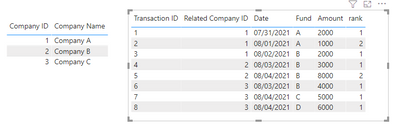
Is this the result you want ? Group by Related Company ID and Fund , rank by Date .
You can create a column to return rank .
rank = rankx(filter(Transactions, [related company id] = earlier( [related company id] ) && [Fund] =earlier(Transactions[Fund]) ), [Date],,ASC, dense)
I have attached my pbix file ,you can refer to it .
Best Regards
Community Support Team _ Ailsa Tao
If this post helps, then please consider Accept it as the solution to help the other members find it more quickly.
Hi @Hamzehn
Is this the result you want ? Group by Related Company ID and Fund , rank by Date .
You can create a column to return rank .
rank = rankx(filter(Transactions, [related company id] = earlier( [related company id] ) && [Fund] =earlier(Transactions[Fund]) ), [Date],,ASC, dense)
I have attached my pbix file ,you can refer to it .
Best Regards
Community Support Team _ Ailsa Tao
If this post helps, then please consider Accept it as the solution to help the other members find it more quickly.
@Hamzehn , if you need rank on date in this table this can be column not measure
rank = rankx(filter(Table, [related company id] = earlier( [related company id] ) && [Fund] =earlier(Fund) ), [Date],,desc, dense)
You can have measure rank on max date
example
rank = rankx(filter(Table, [related company id] = max( [related company id] ) ), calculate(max([Date])),,desc, dense)
For Rank Refer these links
https://radacad.com/how-to-use-rankx-in-dax-part-2-of-3-calculated-measures
https://radacad.com/how-to-use-rankx-in-dax-part-1-of-3-calculated-columns
https://radacad.com/how-to-use-rankx-in-dax-part-3-of-3-the-finale
https://community.powerbi.com/t5/Community-Blog/Dynamic-TopN-made-easy-with-What-If-Parameter/ba-p/3...
Thanks @amitchandak. I think you're right and I may not need a measure exactly to do rankings. For my purpose, since this was going to be an intermediate step of what I was trying to do, I figured I may even get away without having to do the rank by just relying on the date column that's already there.
Check out the April 2026 Power BI update to learn about new features.
If you have recently started exploring Fabric, we'd love to hear how it's going. Your feedback can help with product improvements.
A new Power BI DataViz World Championship is coming this June! Don't miss out on submitting your entry.
| User | Count |
|---|---|
| 41 | |
| 37 | |
| 34 | |
| 21 | |
| 16 |
| User | Count |
|---|---|
| 64 | |
| 58 | |
| 31 | |
| 25 | |
| 25 |