Join us at FabCon Atlanta from March 16 - 20, 2026, for the ultimate Fabric, Power BI, AI and SQL community-led event. Save $200 with code FABCOMM.
Register now!The Power BI Data Visualization World Championships is back! Get ahead of the game and start preparing now! Learn more
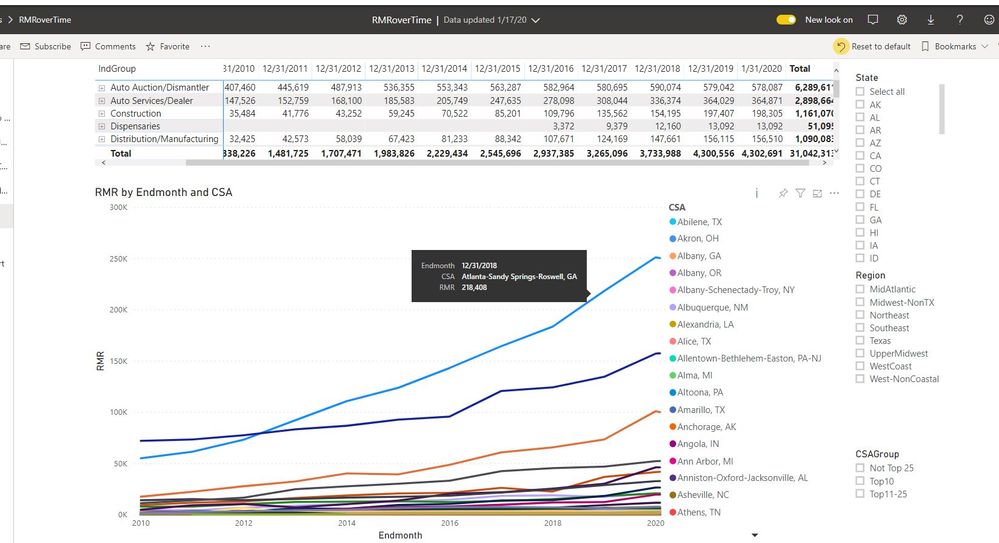
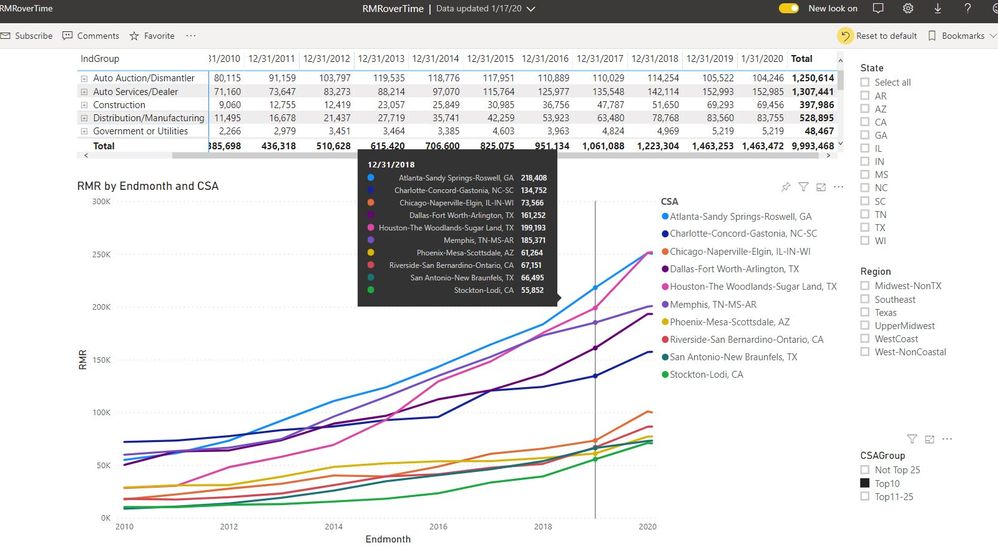
So I've found below when I have tons and tons of lines, the automatic "top 10" tooltip does not appear (as seen in first image below) and I'm able to hover over each line to see what it is. The trouble I have is when the top 10 tooltip does appear, it's hard for me to distinguish between the colors Power BI chooses and also it's just easier imo to be able to hover over each line and the name of the line appear. Is there a way to turn off the tooltip? The two pictures below will make this easier to understand:
I like this:
I don't like this:
Hi @Zarlot531
Would you like to set the different tooltips for the different legends respectively when you hover over the line, rather than use the same tooltip lists? As tested and researching, I'm afraid it is the default design in Power BI currently.
you may add your idea here to let more people know and vote for your idea, finally, it may be accepted by the Product team.
And by the way, I've tried simply to turn the tooltip off but when I do that and hover on the line nothing shows up.
The Power BI Data Visualization World Championships is back! Get ahead of the game and start preparing now!
| User | Count |
|---|---|
| 41 | |
| 38 | |
| 36 | |
| 30 | |
| 28 |
| User | Count |
|---|---|
| 128 | |
| 88 | |
| 79 | |
| 67 | |
| 62 |