cancel
Showing results for 
Search instead for 
Did you mean: 

The Power BI Data Visualization World Championships is back! It's time to submit your entry. Live now!

Reply
AllanBerces
Post Prodigy
Post Prodigy

Hour Distribution

Hi Good day,

Im having trouble in distributing manhours diffirence each row on my table.


First I have a table auto generated by our system everyday and it will override on the following day and will override again on the following day and so on.


1. How can i get the diffirence manHrs of today data if yesterday data overide by today data?

              Yesterday - Today = sum of Diffirence (A)

2. How can i distribute the sum of diffirence per row on my table.

              Sum of Deffirence (A)/no. of day remaning (B) = (C)

                  Where no. of day remaining (B) = 3

                                    2-13-24

                                    2-14-24

                                    2-15-24  

so the outcome will be.

                                    2-13-24 + C

                                    2-14-24 +C

                                    2-15-24 +C

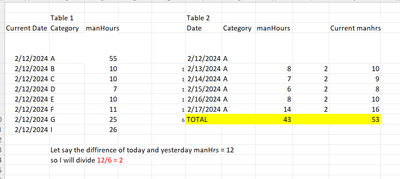
Sample Table below.

AllanBerces_0-1707747939235.png

Thank you in advance

Allan

5 REPLIES 5
Anonymous
Not applicable

Hi @AllanBerces ,

To calculate the difference in man-hours between two sets of data (yesterday's data and today's data), you would ideally need to have a historical record of the data before it gets overwritten. If your system does not store historical data, you might consider implementing a change to preserve each day's data snapshot. However, if you have access to historical data, you can use Power BI to compare the two datasets and calculate the difference.
And you can use these DAXs to create measures for calculating Total:

SUM_manHours 2 = SUMX(ALL('Table 2'), 'Table 2'[manHours])
SUM_manHours 1 = SUMX(FILTER(ALL('Table 1'), 'Table 1'[Category] = "A"), 'Table 1'[manHours])

Then use these DAXs to create new columns:

distribute = 
VAR A = [SUM_manHours 1] - [SUM_manHours 2]
VAR B = COUNTROWS('Table 2')
RETURN
DIVIDE(A, B)
Current manHours = [manHours] + [distribute]

The final output is as below:
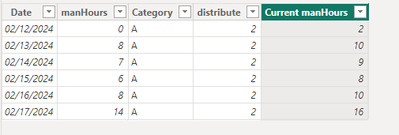
vjunyantmsft_0-1707803387866.png


Best Regards,
Dino Tao
If this post helps, then please consider Accept it as the solution to help the other members find it more quickly.

Hi, Thank you very much on your reply.

it possible to distribute the manHrs on the following days after the current date to max date of my plan, let say in this case taday is Feb-13 so it will distribute from Feb-14 to 17. and the divisor 4 (Feb-14 to 17).


Thank you very much big help.

Anonymous
Not applicable

Hi @AllanBerces ,

Please change the distribute into this:

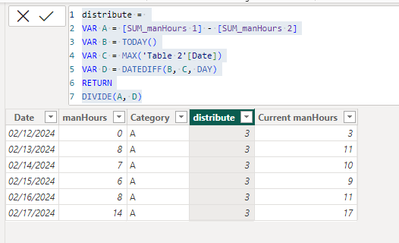
distribute = 
VAR A = [SUM_manHours 1] - [SUM_manHours 2]
VAR B = TODAY()
VAR C = MAX('Table 2'[Date])
VAR D = DATEDIFF(B, C, DAY)
RETURN
DIVIDE(A, D)

The final output is as below:

vjunyantmsft_0-1707807267300.png


Best Regards,
Dino Tao
If this post helps, then please consider Accept it as the solution to help the other members find it more quickly.
Hi,

Any other way to add the increase of hour on my daily plan, if this process wont work.


Thank you and appreciated.

Hi Good day,

Some error on the current manhrs

AllanBerces_2-1707880286784.png


Thank you

Allan

Helpful resources

Announcements
December 2025 Power BI Update Carousel

Power BI Monthly Update - December 2025

Check out the December 2025 Power BI Holiday Recap!

FabCon Atlanta 2026 carousel

FabCon Atlanta 2026

Join us at FabCon Atlanta, March 16-20, for the ultimate Fabric, Power BI, AI and SQL community-led event. Save $200 with code FABCOMM.