Join us at FabCon Atlanta from March 16 - 20, 2026, for the ultimate Fabric, Power BI, AI and SQL community-led event. Save $200 with code FABCOMM.
Register now!Get Fabric certified for FREE! Don't miss your chance! Learn more
Hi
I have data which is structured as follows. I need to create a histogram showing prices (prices are in R per R100. Example, Bob pays R18 600 for a R6 000 000 transaction, this equates to a revenue rate of R0.31 per R100.)
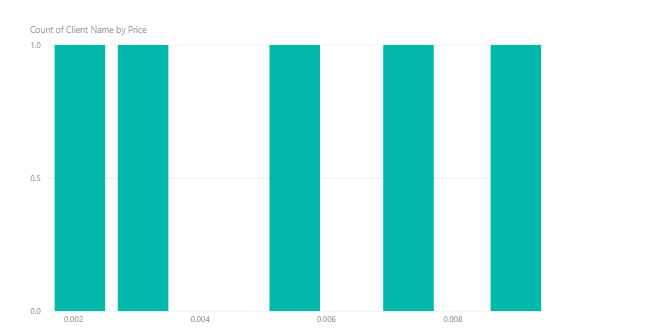
The histogram needs to have prices on the x axis, and the number of clients 'per price'. How do I go about doing that? Because my price is calculated as a measure, I can't bring it into a non value field.
Solved! Go to Solution.
Hi @KabirDhupelia ,
One sample for your reference. Please check the following steps as below.
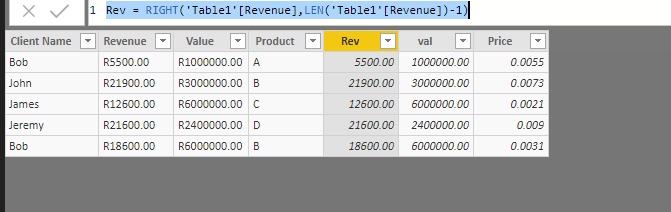
1. Creat two calculated columns as below and format them as number.
Rev = RIGHT('Table1'[Revenue],LEN('Table1'[Revenue])-1)
val = RIGHT('Table1'[Value],LEN('Table1'[Value])-1)
2. New another calculated column.
Price = 'Table1'[Rev]/Table1[val]
Pbix as attached.
Hi @KabirDhupelia ,
One sample for your reference. Please check the following steps as below.
1. Creat two calculated columns as below and format them as number.
Rev = RIGHT('Table1'[Revenue],LEN('Table1'[Revenue])-1)
val = RIGHT('Table1'[Value],LEN('Table1'[Value])-1)
2. New another calculated column.
Price = 'Table1'[Rev]/Table1[val]
Pbix as attached.
Share feedback directly with Fabric product managers, participate in targeted research studies and influence the Fabric roadmap.
Check out the February 2026 Power BI update to learn about new features.
| User | Count |
|---|---|
| 70 | |
| 60 | |
| 47 | |
| 20 | |
| 16 |
| User | Count |
|---|---|
| 109 | |
| 108 | |
| 39 | |
| 27 | |
| 27 |