Join us at FabCon Atlanta from March 16 - 20, 2026, for the ultimate Fabric, Power BI, AI and SQL community-led event. Save $200 with code FABCOMM.
Register now!The Power BI Data Visualization World Championships is back! Get ahead of the game and start preparing now! Learn more
Hi,
i have a table which contains one line per employee and multiple columns included one for the hire date and one for the termination date.
I also have a "date" table.
I want to have in the same visual the number of hired employees and the number of terminated employees per month
it seems very simple but i don't find the solution.
if someone could help me....
Thanks
Solved! Go to Solution.
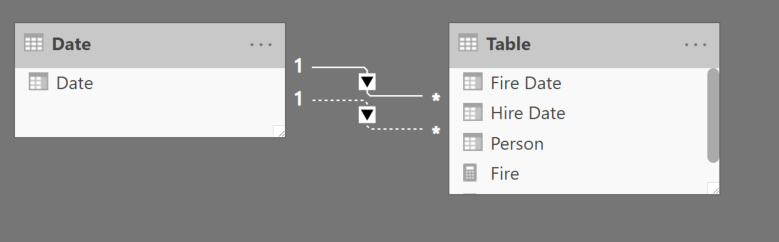
@Anonymous Create a relationship between both dates to your main date table.
In this instance the "Fire Date" is the active relationship so you can use a count of people or create a simple measure
@Anonymous Create a relationship between both dates to your main date table.
In this instance the "Fire Date" is the active relationship so you can use a count of people or create a simple measure
thank you, it works, i juste dicover the USERELARTIONSHIP!
Hi @Anonymous ,
If the date table is related to the other table, you should be able to drop it a visual like a table or matrix (assuming you have a monthname in the table, then create a measure COUNT(table[hired date]) and another COUNT(table[fired date]). The monthname will filter the two measures so that you only get each months count. Of course, use your table and column names in the formula.
Let me know if you have any questions.
If this solves your issues, please mark it as the solution, so that others can find it easily. Kudos are nice too.
Nathaniel
Proud to be a Super User!
The Power BI Data Visualization World Championships is back! Get ahead of the game and start preparing now!
| User | Count |
|---|---|
| 41 | |
| 38 | |
| 36 | |
| 30 | |
| 28 |
| User | Count |
|---|---|
| 128 | |
| 88 | |
| 79 | |
| 67 | |
| 62 |