cancel
Showing results for 
Search instead for 
Did you mean: 

The Power BI Data Visualization World Championships is back! Get ahead of the game and start preparing now! Learn more

Reply
rkumar
Helper III
Helper III

Highlighting columns in a table (Conditional formatting)

Hi All,

Need help with - 

If data values of two columns of a table do not match then highlight those columns or colour those columns,

Eg 


Column AColumn B
22 22
22 43
19 19


Thankyou.

1 ACCEPTED SOLUTION
v-ljerr-msft
Microsoft Employee
Microsoft Employee

Hi @rkumar,


Currently, Power BI doesn’t support conditional format between multiple columns and only support format number. Please refer to https://docs.microsoft.com/en-us/power-bi/desktop-conditional-table-formatting. Here is a similar idea shared on Power BI Ideas forum. You can vote it up and add your comments there to improve Power BI on this feature. Smiley Happy


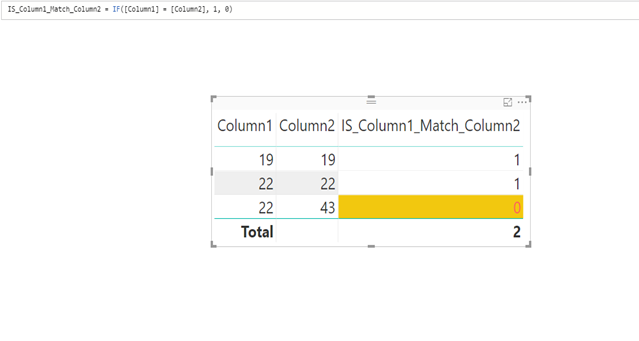
As a workaround you can firstly create a calculate column using the formula below:

IS_Column1_Match_Column2 = IF([Column1] = [Column2], 1, 0)

Then you can use conditional formatting to set the color of the calculate column.

cf1.jpgr2.png

Regards

View solution in original post

1 REPLY 1
v-ljerr-msft
Microsoft Employee
Microsoft Employee

Hi @rkumar,


Currently, Power BI doesn’t support conditional format between multiple columns and only support format number. Please refer to https://docs.microsoft.com/en-us/power-bi/desktop-conditional-table-formatting. Here is a similar idea shared on Power BI Ideas forum. You can vote it up and add your comments there to improve Power BI on this feature. Smiley Happy


As a workaround you can firstly create a calculate column using the formula below:

IS_Column1_Match_Column2 = IF([Column1] = [Column2], 1, 0)

Then you can use conditional formatting to set the color of the calculate column.

cf1.jpgr2.png

Regards

Helpful resources

Announcements
Power BI DataViz World Championships

Power BI Dataviz World Championships

The Power BI Data Visualization World Championships is back! Get ahead of the game and start preparing now!

November Power BI Update Carousel

Power BI Monthly Update - November 2025

Check out the November 2025 Power BI update to learn about new features.

FabCon Atlanta 2026 carousel

FabCon Atlanta 2026

Join us at FabCon Atlanta, March 16-20, for the ultimate Fabric, Power BI, AI and SQL community-led event. Save $200 with code FABCOMM.