Join us at FabCon Atlanta from March 16 - 20, 2026, for the ultimate Fabric, Power BI, AI and SQL community-led event. Save $200 with code FABCOMM.
Register now!The Power BI Data Visualization World Championships is back! Get ahead of the game and start preparing now! Learn more
Is there a way in a table to highlight the first row of a record when the data changes. Example below. Simple table but whenever the Warrant number changes want that row to be highlighted. TIA
Solved! Go to Solution.
Step 1 : First you need to add Index column in power query. Make sure start date should be sorted in Ascending order.
Step 2 : Now add column as per below dax
Rank = RANKX(
FILTER(
yourtable,
EARLIER(yourtable[Warrant]) = yourtable[Warrant]
),
yourtable[Index], , ASC)
Step 3 : Create Measure for highlighting cell
Red =
VAR a1 = SELECTEDVALUE(yourtable[Rank])
Return
SWITCH(TRUE(), a1 = 1, "Red")
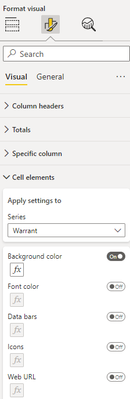
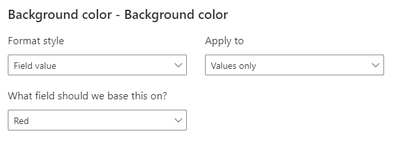
Step 4 : Now applying above Red Measure under cell element as per below snap
Accept as Solution if its worked. if not please connect.
Hi @Razorbx13 ,
Has your problem been solved? If it is solved, you can mark the correct answer. If it is not solved, you can provide more detailed information and we can help you better.
Best Regards,
Liu Yang
If this post helps, then please consider Accept it as the solution to help the other members find it more quickly.
Step 1 : First you need to add Index column in power query. Make sure start date should be sorted in Ascending order.
Step 2 : Now add column as per below dax
Rank = RANKX(
FILTER(
yourtable,
EARLIER(yourtable[Warrant]) = yourtable[Warrant]
),
yourtable[Index], , ASC)
Step 3 : Create Measure for highlighting cell
Red =
VAR a1 = SELECTEDVALUE(yourtable[Rank])
Return
SWITCH(TRUE(), a1 = 1, "Red")
Step 4 : Now applying above Red Measure under cell element as per below snap
Accept as Solution if its worked. if not please connect.
The Power BI Data Visualization World Championships is back! Get ahead of the game and start preparing now!
| User | Count |
|---|---|
| 39 | |
| 37 | |
| 33 | |
| 32 | |
| 29 |
| User | Count |
|---|---|
| 133 | |
| 88 | |
| 85 | |
| 68 | |
| 64 |