Join us at FabCon Atlanta from March 16 - 20, 2026, for the ultimate Fabric, Power BI, AI and SQL community-led event. Save $200 with code FABCOMM.
Register now!Learn from the best! Meet the four finalists headed to the FINALS of the Power BI Dataviz World Championships! Register now
Hi all,
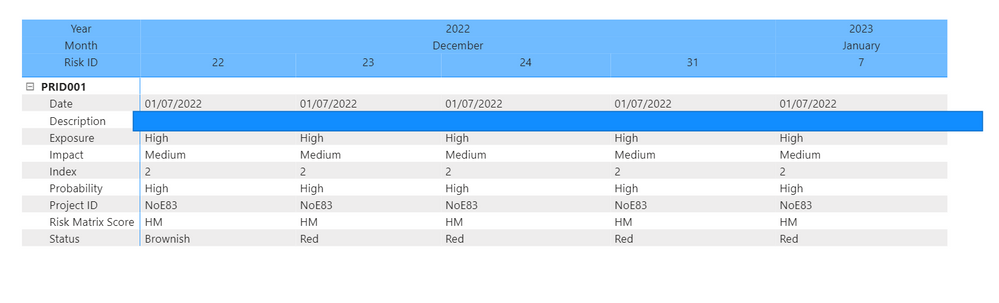
I have a matrix shown below and I am trying to create a measure or filter which compares each column and if there are no changes in my date columns then show blank for that specific row.
I ONLY want to be able to see rows that have different values across each date column.
EXAMPLE: the last row shows 'Brownish' for Dec-22 and 'Red' for the rest of the columns. I would want to keep this row visible as it has changes. The rest of the rows are identicial therefore can be blank.
Can someone explain how this could be done?
Happy to attach the data set if needed. Thank you. (the blue shape is blocking sensitive data)
Please provide sample data that covers your issue or question completely.
https://community.powerbi.com/t5/Community-Blog/How-to-provide-sample-data-in-the-Power-BI-Forum/ba-...
Please show the expected outcome based on the sample data you provided.
https://community.powerbi.com/t5/Desktop/How-to-Get-Your-Question-Answered-Quickly/m-p/1447523
Share feedback directly with Fabric product managers, participate in targeted research studies and influence the Fabric roadmap.
Check out the February 2026 Power BI update to learn about new features.
| User | Count |
|---|---|
| 50 | |
| 49 | |
| 35 | |
| 15 | |
| 14 |
| User | Count |
|---|---|
| 92 | |
| 75 | |
| 41 | |
| 26 | |
| 25 |