Join us at FabCon Atlanta from March 16 - 20, 2026, for the ultimate Fabric, Power BI, AI and SQL community-led event. Save $200 with code FABCOMM.
Register now!The Power BI Data Visualization World Championships is back! It's time to submit your entry. Live now!
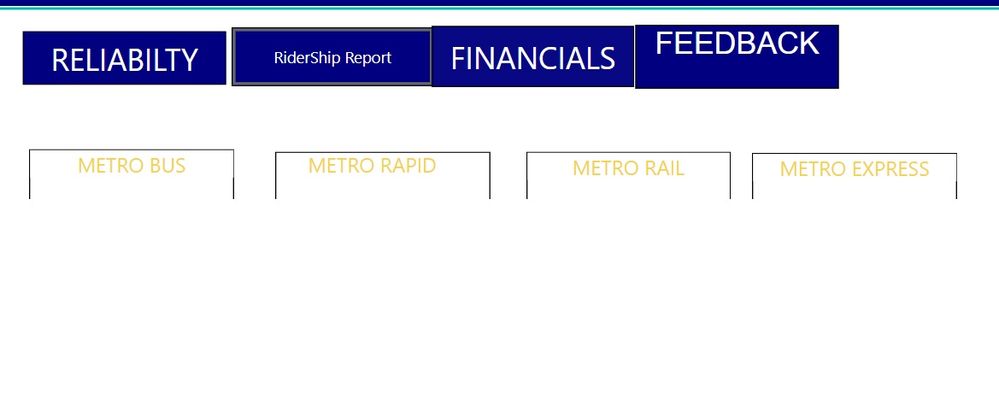
I have report like above and i have 4 buttons in above . Can you please let me know if i can click on rider Report that button as to be highlighted till i navigate to other buttons .can you help me how we can do that?
Solved! Go to Solution.
Hi, @Anonymous you need to put 2 buttons instead 1.
1 button i.e. with blue background (activated), another with transparent background (deactivated). They should have same dimensions and same (x,y). Then create bookmarks to show 1 button or the another one. Finally set a bookmark to the button action.
Apologies for my bad English
Best Regards, Marcos
Hi, @Anonymous you need to put 2 buttons instead 1.
1 button i.e. with blue background (activated), another with transparent background (deactivated). They should have same dimensions and same (x,y). Then create bookmarks to show 1 button or the another one. Finally set a bookmark to the button action.
Apologies for my bad English
Best Regards, Marcos
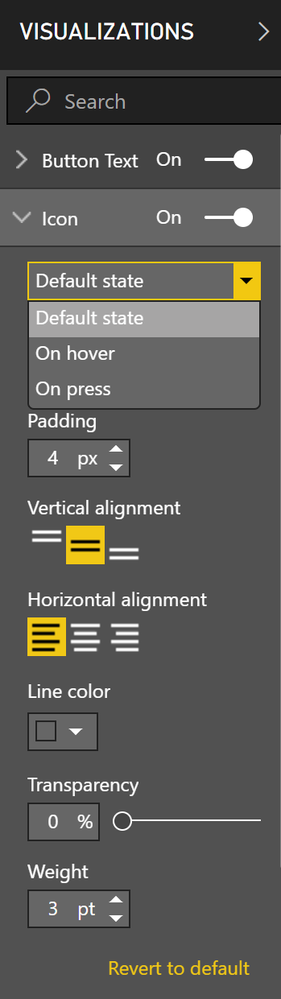
See the "Icon" settings for buttons. Does that do what you want? It has default, hover, and press formatting options.
DAX is for Analysis. Power Query is for Data Modeling
Proud to be a Super User!
MCSA: BI ReportingThe Power BI Data Visualization World Championships is back! It's time to submit your entry.
Check out the January 2026 Power BI update to learn about new features.
| User | Count |
|---|---|
| 56 | |
| 42 | |
| 41 | |
| 21 | |
| 21 |
| User | Count |
|---|---|
| 150 | |
| 107 | |
| 64 | |
| 36 | |
| 36 |