cancel
Showing results for 
Search instead for 
Did you mean: 

Vote for your favorite vizzies from the Power BI Dataviz World Championship submissions. Vote now!

Reply
Anonymous
Not applicable

Highlight Keywords within Large Text Columns

Hi All,

Is there a way in Power BI to highlight keywords in a large feedback text.


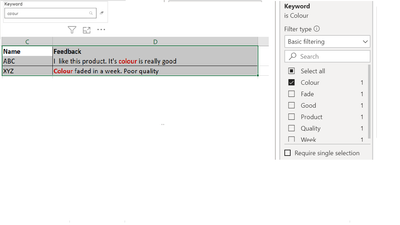
For example i have a table visualization which contains the feedback which i recieved from customers. If user searches for a particular term/keyword using the searchbox or choose a keyword in the filter/slicer, that term/keyword should be highlighted in the feedback text. 


If i search/filter for word "colour" using a text filter or using a slicer that word should  be highlighted in my table visual like in the image given below

Highlight Keyword.png

Is this scenario possible in power BI using DAX or using any custom visuals?

Thanks in Advance,
Sneha

1 ACCEPTED SOLUTION
Icey
Community Support
Community Support

Hi @Anonymous ,


I'm afraid that it is not supported in Power BI currently.

You can vote up these similar ideas to improve the Power BI.

Conditional Formatting - Highlight Specific Text;

WordCloud -conditional formatting words.


Best Regards,

Icey


If this post helps, then please consider Accept it as the solution to help the other members find it more quickly.

View solution in original post

4 REPLIES 4
Syndicate_Admin
Administrator
Administrator

Has it been achieved?

Icey
Community Support
Community Support

Hi @Anonymous ,


I'm afraid that it is not supported in Power BI currently.

You can vote up these similar ideas to improve the Power BI.

Conditional Formatting - Highlight Specific Text;

WordCloud -conditional formatting words.


Best Regards,

Icey


If this post helps, then please consider Accept it as the solution to help the other members find it more quickly.

amitchandak
Super User
Super User

@Anonymous , refer if this can help

https://appsource.microsoft.com/en-us/product/power-bi-visuals/WA104381309?src=office&tab=Overview

https://exceleratorbi.com.au/text-filtering-power-bi/

Share with Power BI Enthusiasts: Full Power BI Video (20 Hours) YouTube
Microsoft Fabric Series 60+ Videos YouTube
Microsoft Fabric Hindi End to End YouTube
Anonymous
Not applicable

Hi Amit (@amitchandak),

Thanks for your reply. I'm already using these text filters in my dashboard. I'm looking for a way to highight the filtered/searched keyword within my feedback text column (Added an image in the above description to depict the exact scenario). Do you think this can be achieved in power BI?


Regards,

Sneha

Helpful resources

Announcements
Power BI DataViz World Championships

Power BI Dataviz World Championships

Vote for your favorite vizzies from the Power BI World Championship submissions!

Sticker Challenge 2026 Carousel

Join our Community Sticker Challenge 2026

If you love stickers, then you will definitely want to check out our Community Sticker Challenge!

January Power BI Update Carousel

Power BI Monthly Update - January 2026

Check out the January 2026 Power BI update to learn about new features.

FabCon Atlanta 2026 carousel

FabCon Atlanta 2026

Join us at FabCon Atlanta, March 16-20, for the ultimate Fabric, Power BI, AI and SQL community-led event. Save $200 with code FABCOMM.