cancel
Showing results for 
Search instead for 
Did you mean: 

Learn from the best! Meet the four finalists headed to the FINALS of the Power BI Dataviz World Championships! Register now

Reply
bebeto
Helper III
Helper III

High RAM consumption

Hi,


I have a pbis that weights 8MB and, when I open it with Power BI Desktop, my CPU RAM rises to 800 MB and suddenly the application closes without showing any error messages.


What is the problem?


Thanks!

1 ACCEPTED SOLUTION
v-caliao-msft
Microsoft Employee
Microsoft Employee

Hi @bebeto,


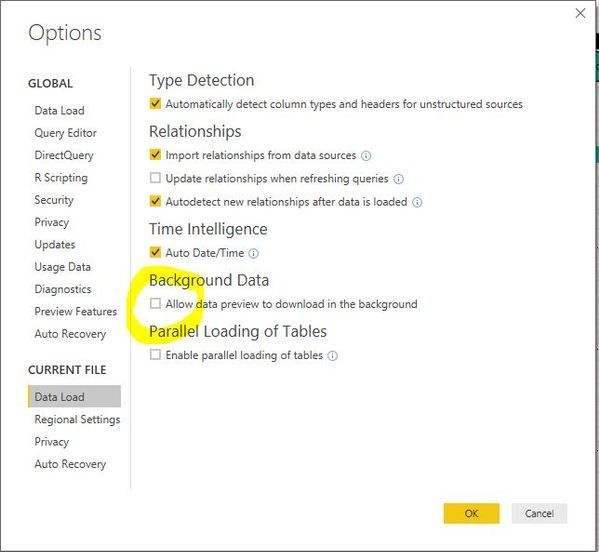
Please try to disable the option
allow data preview to download in the background
and check if this issue persists or not.
large.jpg


Here is a blog which describes this option. Please refer to the link below.
https://blog.crossjoin.co.uk/2016/12/05/power-query-power-bi-and-the-allow-data-preview-to-download-...


Regards,

Charlie Liao

View solution in original post

2 REPLIES 2
v-caliao-msft
Microsoft Employee
Microsoft Employee

Hi @bebeto,


Please try to disable the option
allow data preview to download in the background
and check if this issue persists or not.
large.jpg


Here is a blog which describes this option. Please refer to the link below.
https://blog.crossjoin.co.uk/2016/12/05/power-query-power-bi-and-the-allow-data-preview-to-download-...


Regards,

Charlie Liao

Thanks @v-caliao-msft!!


It solved my problem!

Helpful resources

Announcements
Power BI DataViz World Championships carousel

Power BI DataViz World Championships - June 2026

A new Power BI DataViz World Championship is coming this June! Don't miss out on submitting your entry.

Join our Fabric User Panel

Join our Fabric User Panel

Share feedback directly with Fabric product managers, participate in targeted research studies and influence the Fabric roadmap.

March Power BI Update Carousel

Power BI Community Update - March 2026

Check out the March 2026 Power BI update to learn about new features.