cancel
Showing results for 
Search instead for 
Did you mean: 

The Power BI Data Visualization World Championships is back! Get ahead of the game and start preparing now! Learn more

Reply
bebeto
Helper III
Helper III

High RAM consumption

Hi,


I have a pbis that weights 8MB and, when I open it with Power BI Desktop, my CPU RAM rises to 800 MB and suddenly the application closes without showing any error messages.


What is the problem?


Thanks!

1 ACCEPTED SOLUTION
v-caliao-msft
Microsoft Employee
Microsoft Employee

Hi @bebeto,


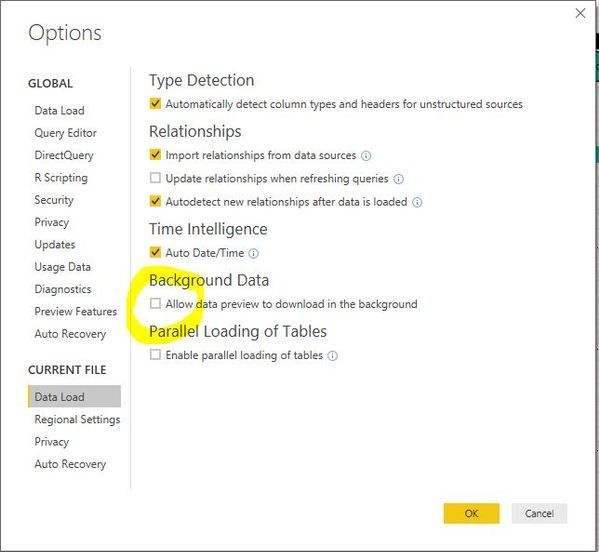
Please try to disable the option
allow data preview to download in the background
and check if this issue persists or not.
large.jpg


Here is a blog which describes this option. Please refer to the link below.
https://blog.crossjoin.co.uk/2016/12/05/power-query-power-bi-and-the-allow-data-preview-to-download-...


Regards,

Charlie Liao

View solution in original post

2 REPLIES 2
v-caliao-msft
Microsoft Employee
Microsoft Employee

Hi @bebeto,


Please try to disable the option
allow data preview to download in the background
and check if this issue persists or not.
large.jpg


Here is a blog which describes this option. Please refer to the link below.
https://blog.crossjoin.co.uk/2016/12/05/power-query-power-bi-and-the-allow-data-preview-to-download-...


Regards,

Charlie Liao

Thanks @v-caliao-msft!!


It solved my problem!

Helpful resources

Announcements
Power BI DataViz World Championships

Power BI Dataviz World Championships

The Power BI Data Visualization World Championships is back! Get ahead of the game and start preparing now!

December 2025 Power BI Update Carousel

Power BI Monthly Update - December 2025

Check out the December 2025 Power BI Holiday Recap!

FabCon Atlanta 2026 carousel

FabCon Atlanta 2026

Join us at FabCon Atlanta, March 16-20, for the ultimate Fabric, Power BI, AI and SQL community-led event. Save $200 with code FABCOMM.