FabCon is coming to Atlanta
Join us at FabCon Atlanta from March 16 - 20, 2026, for the ultimate Fabric, Power BI, AI and SQL community-led event. Save $200 with code FABCOMM.
Register now!- Power BI forums
- Get Help with Power BI
- Desktop
- Service
- Report Server
- Power Query
- Mobile Apps
- Developer
- DAX Commands and Tips
- Custom Visuals Development Discussion
- Health and Life Sciences
- Power BI Spanish forums
- Translated Spanish Desktop
- Training and Consulting
- Instructor Led Training
- Dashboard in a Day for Women, by Women
- Galleries
- Data Stories Gallery
- Themes Gallery
- Contests Gallery
- Quick Measures Gallery
- Notebook Gallery
- Translytical Task Flow Gallery
- TMDL Gallery
- R Script Showcase
- Webinars and Video Gallery
- Ideas
- Custom Visuals Ideas (read-only)
- Issues
- Issues
- Events
- Upcoming Events
Join the Fabric FabCon Global Hackathon—running virtually through Nov 3. Open to all skill levels. $10,000 in prizes! Register now.
- Power BI forums
- Forums
- Get Help with Power BI
- Desktop
- Re: Hierarchy slicer: Not to show field name in ma...
- Subscribe to RSS Feed
- Mark Topic as New
- Mark Topic as Read
- Float this Topic for Current User
- Bookmark
- Subscribe
- Printer Friendly Page

- Mark as New
- Bookmark
- Subscribe
- Mute
- Subscribe to RSS Feed
- Permalink
- Report Inappropriate Content
Hierarchy slicer: Not to show field name in made selection
Hello,
I have in my dashboard a slicer awith two levels country and city.
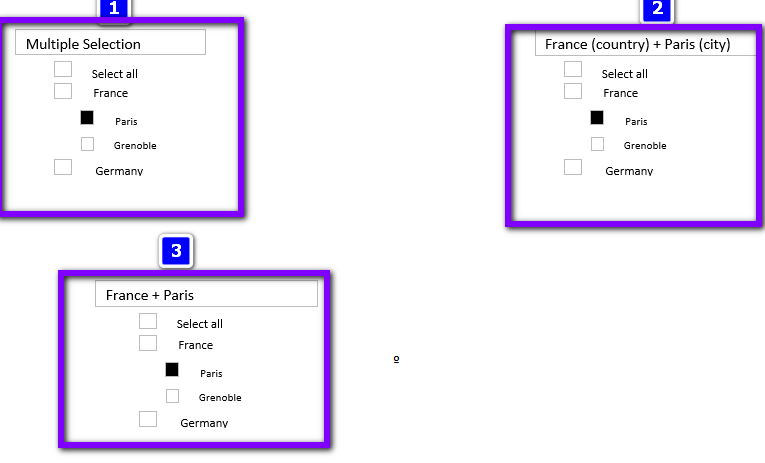
When I select Paris inside France, in Desktop the slicer gets "Multiple Selection" text but when I publish the dashboard the slicer gets "France (country) + Paris (city)".
I would like to see it like this "France + Paris", without name fields in parenthesis.
Is it possible?
Thanks


- Mark as New
- Bookmark
- Subscribe
- Mute
- Subscribe to RSS Feed
- Permalink
- Report Inappropriate Content
Our customer has the exact same requirement; is there any way to fulfill it?

- Mark as New
- Bookmark
- Subscribe
- Mute
- Subscribe to RSS Feed
- Permalink
- Report Inappropriate Content
Has anyone found a solution for this?

- Mark as New
- Bookmark
- Subscribe
- Mute
- Subscribe to RSS Feed
- Permalink
- Report Inappropriate Content

- Mark as New
- Bookmark
- Subscribe
- Mute
- Subscribe to RSS Feed
- Permalink
- Report Inappropriate Content
Hi @Tim-1967 ,
we running into the same problem as you Tim. Do you find a workaround for your problem?
@amitchandak : Do you have any idea how we change change the displayed values in the slicer?
I know we can display them in the titel or header but maybe there is an idea to change the selected slicer values to only values and not attribute name in brackets.
Best
Manuel

- Mark as New
- Bookmark
- Subscribe
- Mute
- Subscribe to RSS Feed
- Permalink
- Report Inappropriate Content
Hello @Tim-1967 ,
We're sorry that you can only control the title of another Visual with a slicer, you can't use Slicer to control your own title.
Slicer 1 only controls the title of the table visual.
You can create a measure like this and put it in the title text.
Measure =
var _x = SELECTEDVALUE('Table'[name1])
var _y = SELECTEDVALUE('Table'[name2])
return
 _x & "+" &_y
If you want to control the title of slicer 1, you must create a new table that contains the hierarchy slicer, and then use it to create a new slicer.
Next, create a new measure to control slicer 1.
Measure 2 =
var _x = SELECTEDVALUE('Table 2'[name1])
var _y = SELECTEDVALUE('Table 2'[name2])
return
 _x & "+" &_y
If you don't meet your requirements, could you show the exact expected result based on the table you shared?
Best regards
Community support team _ zhenbw
If this post helps,then consider Accepting it as the solution to help other members find it faster.
BTW, pbix as an attachment.


- Mark as New
- Bookmark
- Subscribe
- Mute
- Subscribe to RSS Feed
- Permalink
- Report Inappropriate Content
@Tim-1967 , The information you have provided is not making the problem clear to me. Can you please explain with an example.
where you are getting that, can you share some screenshot
Appreciate your Kudos.
- Mark as New
- Bookmark
- Subscribe
- Mute
- Subscribe to RSS Feed
- Permalink
- Report Inappropriate Content
- Mark as New
- Bookmark
- Subscribe
- Mute
- Subscribe to RSS Feed
- Permalink
- Report Inappropriate Content
Hi @amitchandak,
Point 1 is how I see slicer in desktop
Point 2 is how I see the slicer in the published report (online)
Point 3 is how I'd like to see the slicer in the published report
Hope it helps
Thanks


- Mark as New
- Bookmark
- Subscribe
- Mute
- Subscribe to RSS Feed
- Permalink
- Report Inappropriate Content
Did you ever find a solution?
Helpful resources

Power BI Monthly Update - September 2025
Check out the September 2025 Power BI update to learn about new features.

FabCon Atlanta 2026
Join us at FabCon Atlanta, March 16-20, for the ultimate Fabric, Power BI, AI and SQL community-led event. Save $200 with code FABCOMM.


