Join us at FabCon Atlanta from March 16 - 20, 2026, for the ultimate Fabric, Power BI, AI and SQL community-led event. Save $200 with code FABCOMM.
Register now!The Power BI Data Visualization World Championships is back! It's time to submit your entry. Live now!
Hello, I have following problem.
In my report I am using hierarchical slicer with AND logic - solution presented in this article:
https://medium.com/seismic-data-science/changing-or-to-and-logic-for-power-bi-slicers-1a6b20aee5f5
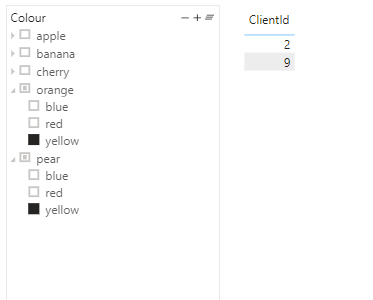
This is my data visualisation:
I want to know how many have fruits in selected colours, and I can do this. But now I want to know what are the other values for these filtered clients and I can't put my finger on which method I should use. Can anybody can help me with these?
Here is link to the pbix with example:
https://we.tl/t-b0cGih4nf2
Solved! Go to Solution.
Hi @DarSz ,
Since the original table has been filtered by slicer, you will need to copy it as an independent table.
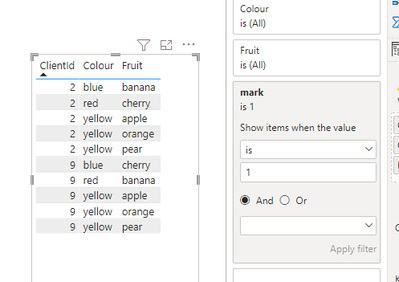
Then create a measure like below and use it as visual filter.
mark =
var ids = CALCULATETABLE(VALUES(Client[ClientId]),
FILTER('Client', [HierarchySlicer Check] = 1))
return
IF(SELECTEDVALUE('Table (2)'[ClientId]) in ids,1,0)
Result:
Best Regards,
Jay
Hi @DarSz ,
Since the original table has been filtered by slicer, you will need to copy it as an independent table.
Then create a measure like below and use it as visual filter.
mark =
var ids = CALCULATETABLE(VALUES(Client[ClientId]),
FILTER('Client', [HierarchySlicer Check] = 1))
return
IF(SELECTEDVALUE('Table (2)'[ClientId]) in ids,1,0)
Result:
Best Regards,
Jay
| User | Count |
|---|---|
| 50 | |
| 42 | |
| 36 | |
| 31 | |
| 28 |
| User | Count |
|---|---|
| 139 | |
| 129 | |
| 61 | |
| 59 | |
| 57 |