Don't miss your chance to take the Fabric Data Engineer (DP-700) exam on us!
Learn moreWe've captured the moments from FabCon & SQLCon that everyone is talking about, and we are bringing them to the community, live and on-demand. Starts on April 14th. Register now
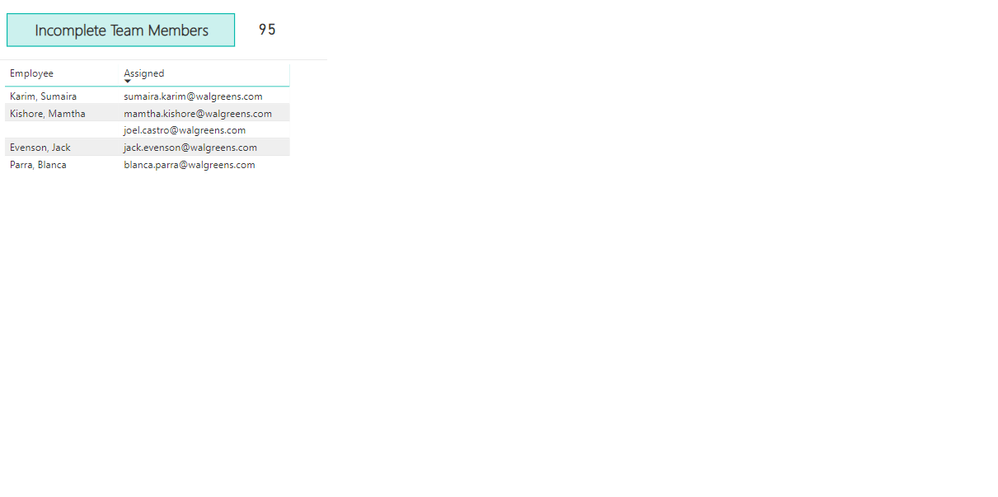
I am trying to hide a column in the table visualization; I've tried to just shrink manually by adjusting size and then turned off word wrap, any other suggestions? (trying to hide the 'assigned' column)
Solved! Go to Solution.
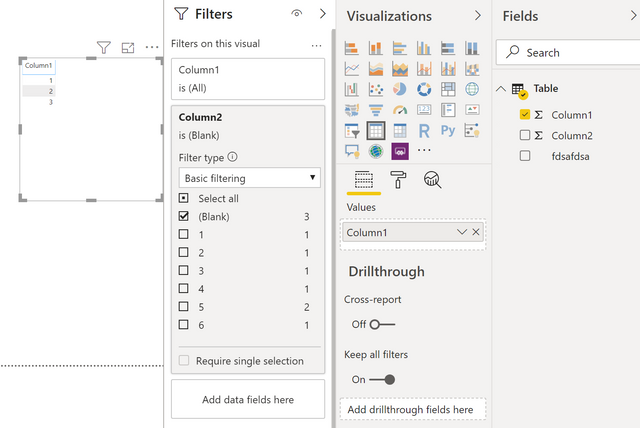
You can just remove it from the visual? If you are afraid you are losing your filters, you can actually just drop a column in de filters without having it display in the table itself. In the example below I have a table with column1 in it, but filtered on Column2.
Kind regards
Djerro123
-------------------------------
If this answered your question, please mark it as the Solution. This also helps others to find what they are looking for.
Kudo's are welcome 🙂
Proud to be a Super User!
Not my post, but same issue. Need the column for filter context integrity, but the column value is of no import to the reader.
How to Hide a Column in Power BI Visual - Zebra BI
This guide has a solution that works. Essentially turning off Value and Column header text wrapping, then manually adjusting the width from the table itself (not the settings) to hide the column.
You can just remove it from the visual? If you are afraid you are losing your filters, you can actually just drop a column in de filters without having it display in the table itself. In the example below I have a table with column1 in it, but filtered on Column2.
Kind regards
Djerro123
-------------------------------
If this answered your question, please mark it as the Solution. This also helps others to find what they are looking for.
Kudo's are welcome 🙂
Proud to be a Super User!
If you have recently started exploring Fabric, we'd love to hear how it's going. Your feedback can help with product improvements.
A new Power BI DataViz World Championship is coming this June! Don't miss out on submitting your entry.
Share feedback directly with Fabric product managers, participate in targeted research studies and influence the Fabric roadmap.
| User | Count |
|---|---|
| 56 | |
| 40 | |
| 36 | |
| 20 | |
| 18 |
| User | Count |
|---|---|
| 74 | |
| 72 | |
| 38 | |
| 35 | |
| 26 |