cancel
Showing results for 
Search instead for 
Did you mean: 

Get Fabric Certified for FREE during Fabric Data Days. Don't miss your chance! Request now

Reply
Anonymous
Not applicable

Hide total of single column

Hey all

I was wondering i fit is possible to hide the total row/cell for a single column. Or at least give it the value manually. Or change the font settings to make it visible…

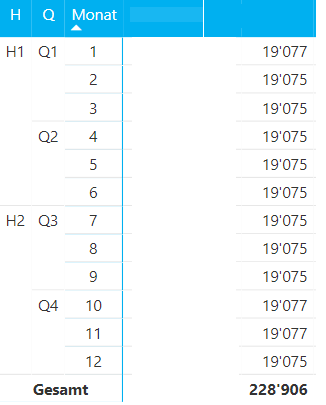
In the screenshot below I have the column “col”. It wasn’t possible to count directly by Power BI so this is a custom SQL snippet.

To get the expected result we count all entries, so you get the correct nr of entries per month.

But the total of 228k is wrong. It should distinct count the column, but due to the custom sql code not possible.


1.PNG


I did not find any method to hide the value or change it manually. Setting a white box over it does only work as long as the user don’t change the month/quarter filters…


Thank you and kind regards

1 ACCEPTED SOLUTION

Hi @Anonymous

Basically, you could average with this formula

Measure 2 = IF(HASONEVALUE(Sheet1[H]),COUNT(Sheet1[COL]),AVERAGEX(Sheet1,COUNT(Sheet1[COL])))

If it doesn't give the correct result, please give an example of your expected output based on my test data.


Best Regards

Maggie

View solution in original post

6 REPLIES 6
Skorcamp
Advocate I
Advocate I

You could change the text color for the total of that *specific column* to match the background.

Anonymous
Not applicable

Select do not summarize for the column you don't want the total

v-juanli-msft
Community Support
Community Support

Hi @Anonymous

I don't know what do you mean "the total should distinct count the column", so i calculate the total as below.

after add columns in the matrix, 

create a measure:

Measure = IF(HASONEVALUE(Sheet1[H]),MAX([COL]),DISTINCTCOUNT(Sheet1[COL]))

2.png


Best Regards

Maggie


Community Support Team _ Maggie Li
If this post helps, then please consider Accept it as the solution to help the other members find it more quickly.

Anonymous
Not applicable

Thanks for your reply @v-juanli-msft.


This kinda works as i want it to, thank you.

I need the "ELSE" Value to be avg from count(COL). This does not work. If i create a measure that counts COL i cannot use it in the avg function.

How can i achieve that? If not possible, can the "ELSE" Value be blank?


TestMeasure = IF(HASONEVALUE('Table1[H]);COUNT(Table2[COL]);AVERAGE(Count(Table2[COL])))

Hi @Anonymous

Basically, you could average with this formula

Measure 2 = IF(HASONEVALUE(Sheet1[H]),COUNT(Sheet1[COL]),AVERAGEX(Sheet1,COUNT(Sheet1[COL])))

If it doesn't give the correct result, please give an example of your expected output based on my test data.


Best Regards

Maggie

Anonymous
Not applicable

Was able to set it to blank, but want to know anyways if it is possible to set it to avg of count

Helpful resources

Announcements
November Power BI Update Carousel

Power BI Monthly Update - November 2025

Check out the November 2025 Power BI update to learn about new features.

Fabric Data Days Carousel

Fabric Data Days

Advance your Data & AI career with 50 days of live learning, contests, hands-on challenges, study groups & certifications and more!

FabCon Atlanta 2026 carousel

FabCon Atlanta 2026

Join us at FabCon Atlanta, March 16-20, for the ultimate Fabric, Power BI, AI and SQL community-led event. Save $200 with code FABCOMM.

Top Solution Authors
Top Kudoed Authors