Join us at FabCon Atlanta from March 16 - 20, 2026, for the ultimate Fabric, Power BI, AI and SQL community-led event. Save $200 with code FABCOMM.
Register now!The Power BI Data Visualization World Championships is back! Get ahead of the game and start preparing now! Learn more
In some reports, I hide all the filters from the "Filters on this visual" pane - I don't want users to be able to play with these. Obviously, doing this manually for each and every filter is rather tedious, especially when I have multiple visuals or when I have a table with lots of columns.
I would like these filters to be hidden be default. Is there a way to do it globally, per report or at least per page?
I don't want to hide the filter panel completely. Sometimes I have visual level filters that I do want end users to see. Let's say I have a 20 columns table filtered by a locked filter - a field not used as one of the table's columns. I do want the users to be able to see that filter, as it informs them about what data the table includes. But then I need to manually hide 20 visual level filters for that table, which is not great.
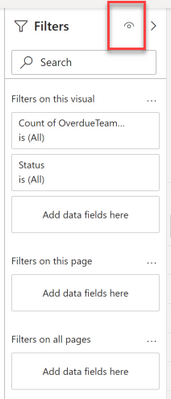
If I interpret the question correctly, you can hide then entire panel. Click the eyeball in the top right corner of the panel
I do this for all of my reports on every page.
@Iwanicki , under the visual header, you have the option to uncheck the filter icon. You can use that.
I think it works on power bi service after publish. Usually visual header changes do not work on desktop
The Power BI Data Visualization World Championships is back! Get ahead of the game and start preparing now!
| User | Count |
|---|---|
| 39 | |
| 38 | |
| 36 | |
| 28 | |
| 28 |
| User | Count |
|---|---|
| 124 | |
| 88 | |
| 74 | |
| 66 | |
| 65 |