Learn from the best! Meet the four finalists headed to the FINALS of the Power BI Dataviz World Championships! Register now
Hi there.
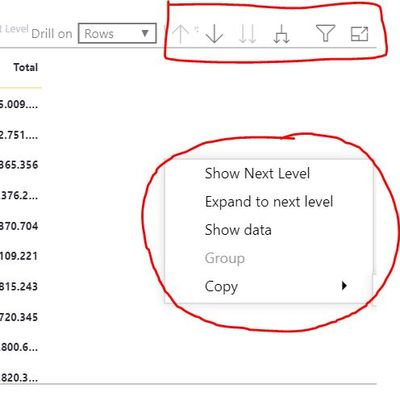
I've been asked about the possibility to control the Right-Click Context Menu. The idea is to avoid users to use it instead of the options present on every chart when want to navigate/drill on the hierarchies.
Is it possible to reach this in Power BI? I looked for a possible solution, but so far nothing seems to be available.
Regards.
Solved! Go to Solution.
Have a look in the Format pane for the matrix/table visual. You can control each individual element of the context menu individually, or you can switch it off all together.
The confusing bit is that it always shows in Power BI Desktop, but when you publish it to the service, then you will notice that the options kick in and will only display what you tell it to.
Hope this helps:
Hi @djbc1986 ,
The right click option on the visuals is something that comes as a feature in Power BI. It is currently not possible to disable it.
Thanks.
Hi @djbc1986 ,
The right click option on the visuals is something that comes as a feature in Power BI. It is currently not possible to disable it.
Thanks.
Hi,
As @Anonymous says you can disable the visual headers as he shows.
You cannot however disable the right click menu as far as i know but you can vote for a similar idea
Have a look in the Format pane for the matrix/table visual. You can control each individual element of the context menu individually, or you can switch it off all together.
The confusing bit is that it always shows in Power BI Desktop, but when you publish it to the service, then you will notice that the options kick in and will only display what you tell it to.
Hope this helps:
A new Power BI DataViz World Championship is coming this June! Don't miss out on submitting your entry.
Share feedback directly with Fabric product managers, participate in targeted research studies and influence the Fabric roadmap.
| User | Count |
|---|---|
| 50 | |
| 33 | |
| 32 | |
| 18 | |
| 17 |
| User | Count |
|---|---|
| 64 | |
| 64 | |
| 41 | |
| 27 | |
| 24 |