cancel
Showing results for 
Search instead for 
Did you mean: 

The Power BI Data Visualization World Championships is back! Get ahead of the game and start preparing now! Learn more

Reply
Anonymous
Not applicable

Hide Column headers

Hi,


is there a way toi hide the column names when the "main" seccion (Plazo)  is not expanded? 

baxter2_nois102_0-1629733254290.png


1 ACCEPTED SOLUTION
Anonymous
Not applicable

Hi @Anonymous ,

There is currently no method to modify this directly in Matrix's format setting

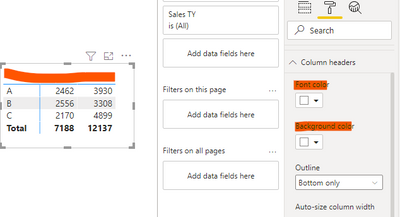
As a workaround. you could set the Font color same with the Background color in column headers formatting.

vcaitlynmstf_0-1630026645048.png


But if you use this method, you have to hide the entire title.

So there is a second workaround:

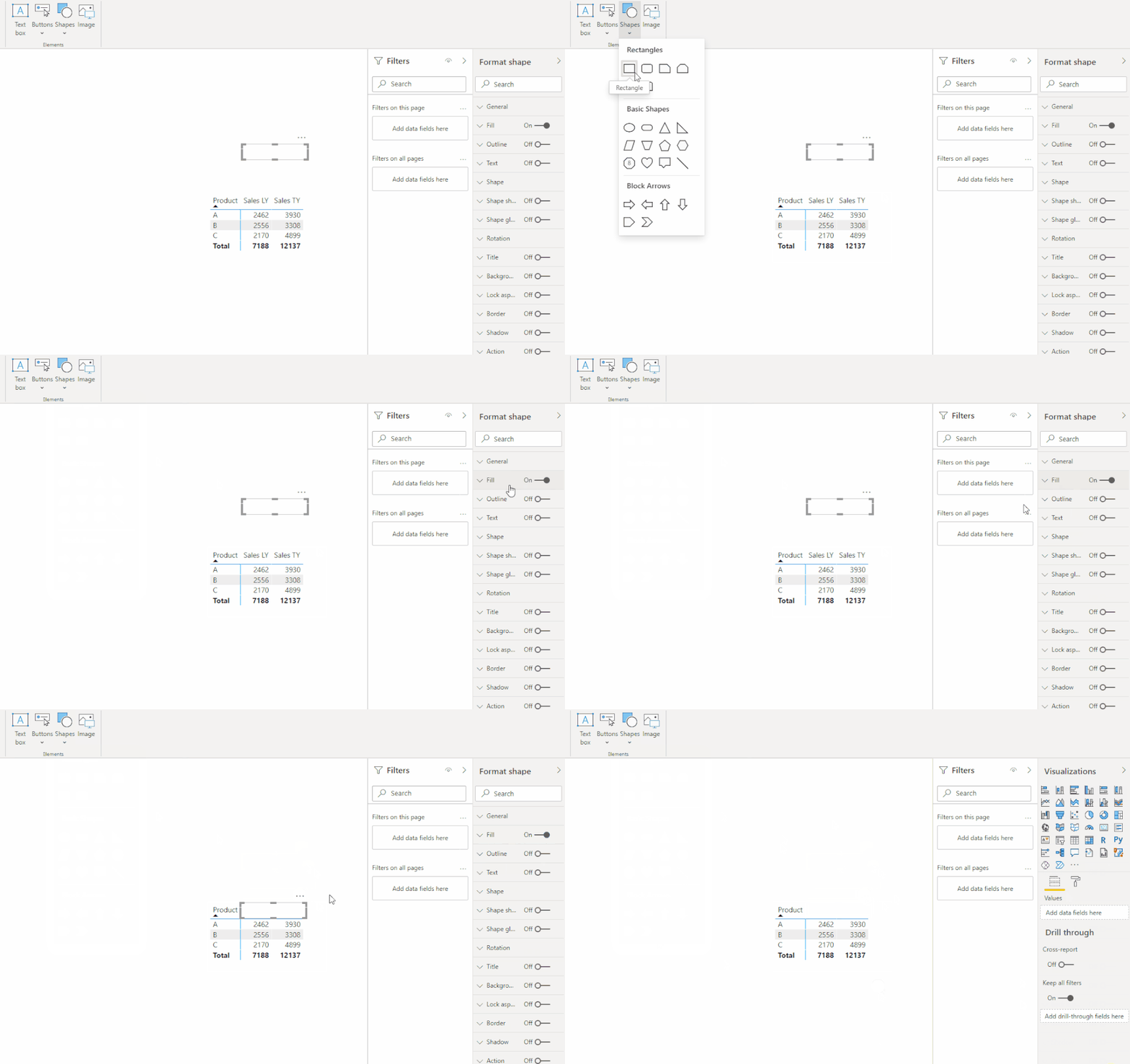
Insert a rectangle, resize it and format it, then put it over the column header.

0825.gif


In the end, if you want to hide the unselected column header, this is not possible at the moment, we suggest you to check if there is the same need as you in the Power BI Idea , you can vote for it.


Hope it helps,


Caitlyn Yan


If this post helps then please consider Accept it as the solution to help the other members find it more quickly.


View solution in original post

3 REPLIES 3
Anonymous
Not applicable

Hi @Anonymous ,


Does the replies above solve your problem? If it has been solved, please mark the correct reply as the standard answer to help the other members find it more quickly.Thank you very much for your kind cooperation!


Community Support Team _ Caitlyn Yan


Anonymous
Not applicable

Hi @Anonymous ,

There is currently no method to modify this directly in Matrix's format setting

As a workaround. you could set the Font color same with the Background color in column headers formatting.

vcaitlynmstf_0-1630026645048.png


But if you use this method, you have to hide the entire title.

So there is a second workaround:

Insert a rectangle, resize it and format it, then put it over the column header.

0825.gif


In the end, if you want to hide the unselected column header, this is not possible at the moment, we suggest you to check if there is the same need as you in the Power BI Idea , you can vote for it.


Hope it helps,


Caitlyn Yan


If this post helps then please consider Accept it as the solution to help the other members find it more quickly.


amitchandak
Super User
Super User

@Anonymous , How you got it, I doubt matrix give it like that

Share with Power BI Enthusiasts: Full Power BI Video (20 Hours) YouTube
Microsoft Fabric Series 60+ Videos YouTube
Microsoft Fabric Hindi End to End YouTube

Helpful resources

Announcements
Power BI DataViz World Championships

Power BI Dataviz World Championships

The Power BI Data Visualization World Championships is back! Get ahead of the game and start preparing now!

December 2025 Power BI Update Carousel

Power BI Monthly Update - December 2025

Check out the December 2025 Power BI Holiday Recap!

FabCon Atlanta 2026 carousel

FabCon Atlanta 2026

Join us at FabCon Atlanta, March 16-20, for the ultimate Fabric, Power BI, AI and SQL community-led event. Save $200 with code FABCOMM.