cancel
Showing results for 
Search instead for 
Did you mean: 

The Power BI Data Visualization World Championships is back! Get ahead of the game and start preparing now! Learn more

Reply
Anonymous
Not applicable

Helping to get the decimals out of only one column

Im using a formula in my matrix table but I need to keep the decimals in the total column and get rid of them in the other columns.

Is there a way to do that?

Avg Total 2 = 
VAR Months =
    CALCULATE(COUNTROWS( ALLSELECTED ( PBI[Fecha];PBI[D_Laborales] ));PBI[D_Laborales]<>7)
RETURN
    IF (
        ISINSCOPE ( PBI[Fecha] );
        SUM ( PBI[Total] );
        DIVIDE (SUM ( PBI[Total]); Months ))

Is there a way to do that?

Sample DATA:

https://www.dropbox.com/s/pvr3htf4c3m3e0c/BI%20VISITAS%20DEMO%20forum.pbix?dl=0


1 ACCEPTED SOLUTION

Hi @Anonymous 

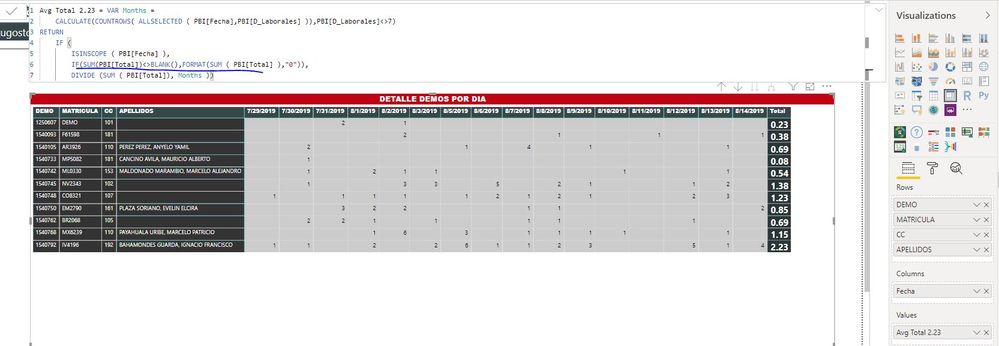
After changing your measure as below

Avg Total 2.23 = VAR Months =
    CALCULATE(COUNTROWS( ALLSELECTED ( PBI[Fecha],PBI[D_Laborales] )),PBI[D_Laborales]<>7)
RETURN
    IF (
        ISINSCOPE ( PBI[Fecha] ),
        IF(SUM(PBI[Total])<>BLANK(),FORMAT(SUM ( PBI[Total] ),"0")),
        DIVIDE (SUM ( PBI[Total]), Months ))

Capture2.JPG


Best Regards
Maggie
Community Support Team _ Maggie Li
If this post helps, then please consider Accept it as the solution to help the other members find it more quickly.

View solution in original post

4 REPLIES 4
v-juanli-msft
Community Support
Community Support

Hi @Anonymous 

Create a measure

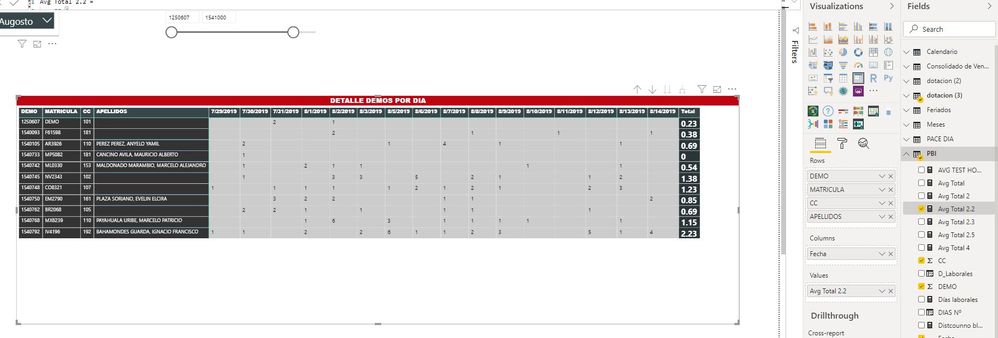
Avg Total 2.2 = 
    IF (
        HASONEVALUE( PBI[Fecha] ),
        IF([Avg Total 2]<>BLANK(),FORMAT([Avg Total 2],"0")),
       IF([Avg Total 2]<>BLANK(), FORMAT([Avg Total 2],"0.00"))
       )

Capture9.JPG

But it is a measure which is of type Text, you can use the [Avg Total 2] for other calculations.


Best Regards
Maggie
Community Support Team _ Maggie Li
If this post helps, then please consider Accept it as the solution to help the other members find it more quickly.
Anonymous
Not applicable

hI @v-juanli-msft why it gives "0" in the fourth line? it should be 0,14

and it is possible to get a cero insteadoof  empty spaces.


Becasue there is something important Id like to see in this matrix, which is to show always everybody from the list even if they have no values in any days.


Please help me with that... it is really hard for me to understand the logic of what you did and find a solution by my self.


Hi @Anonymous 

After changing your measure as below

Avg Total 2.23 = VAR Months =
    CALCULATE(COUNTROWS( ALLSELECTED ( PBI[Fecha],PBI[D_Laborales] )),PBI[D_Laborales]<>7)
RETURN
    IF (
        ISINSCOPE ( PBI[Fecha] ),
        IF(SUM(PBI[Total])<>BLANK(),FORMAT(SUM ( PBI[Total] ),"0")),
        DIVIDE (SUM ( PBI[Total]), Months ))

Capture2.JPG


Best Regards
Maggie
Community Support Team _ Maggie Li
If this post helps, then please consider Accept it as the solution to help the other members find it more quickly.
natabird3
Skilled Sharer
Skilled Sharer

Try using the Format function:


FORMAT( 12345.67, "General Number"
FORMAT( 12345.67, "Currency"
FORMAT( 12345.67, "Fixed"
FORMAT( 12345.67, "Standard"
FORMAT( 12345.67, "Percent"
FORMAT( 12345.67, "Scientific"

Helpful resources

Announcements
Power BI DataViz World Championships

Power BI Dataviz World Championships

The Power BI Data Visualization World Championships is back! Get ahead of the game and start preparing now!

December 2025 Power BI Update Carousel

Power BI Monthly Update - December 2025

Check out the December 2025 Power BI Holiday Recap!

FabCon Atlanta 2026 carousel

FabCon Atlanta 2026

Join us at FabCon Atlanta, March 16-20, for the ultimate Fabric, Power BI, AI and SQL community-led event. Save $200 with code FABCOMM.