
cancel
Showing results for 
Search instead for 
Did you mean: 

The FabCon + SQLCon recap series starts April 14th at 8am Pacific. If you’re tracking where AI is going inside Fabric, this first session is a can't miss. Register now

Reply
NickolajJessen
Solution Sage
Solution Sage

Help with stored SQL procedure in Power-query

Problem: An Amount is changing from "+" to "-" during my SQL-procedure.

I'm not sure if the problem is with BI or my SQL-query (probably the latter)

This only happens to this single record. All other records are fine.


NB.
Ordrenummer = Order number
Finanskonto = Financial Account

Beløb = Amount

Dato = Date


It's perfectly fine when looking it up in the database with a simple query.

BI 21-02 2.PNG

But when loading it into BI, it changes....

BI 21-02.PNG


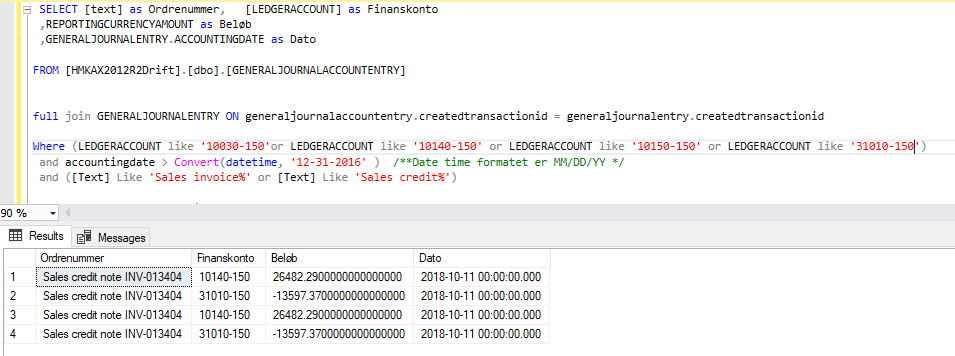
This is the SQL procedure i use


BI 21-02 3.PNG

1 ACCEPTED SOLUTION

Hello, Thank you for your reply


Your response let me on the right track. Changing the type of JOIN didn't do anything, but removing the entire JOIN resulted in only 2 rows beeing returned by the query.. Meaning it was a 'simple' matter of havning duplicate data produced by the JOIN. Added DISTINCT and now it works like a charm.


Here are two links, if anyone should ever come across this thread with a simular issue:


https://stackoverflow.com/questions/3270335/sql-query-producing-duplicate-rows-and-i-cant-see-why


https://teamsql.io/blog/?p=2140

View solution in original post

2 REPLIES 2
d_gosbell
Super User
Super User

This does not look like a Power BI issue. The data in Power BI matches the screen shot from your stored procedure. So you need to figure out why the output of you stored proc and your query are different. It could be due to the FULL JOIN. I don't think this looks right. I would guess that maybe this should be an inner or left join, but I don't know anything about your data so I could be mistaken. 

Hello, Thank you for your reply


Your response let me on the right track. Changing the type of JOIN didn't do anything, but removing the entire JOIN resulted in only 2 rows beeing returned by the query.. Meaning it was a 'simple' matter of havning duplicate data produced by the JOIN. Added DISTINCT and now it works like a charm.


Here are two links, if anyone should ever come across this thread with a simular issue:


https://stackoverflow.com/questions/3270335/sql-query-producing-duplicate-rows-and-i-cant-see-why


https://teamsql.io/blog/?p=2140

Helpful resources

Announcements
New to Fabric survey Carousel

New to Fabric Survey

If you have recently started exploring Fabric, we'd love to hear how it's going. Your feedback can help with product improvements.

Power BI DataViz World Championships carousel

Power BI DataViz World Championships - June 2026

A new Power BI DataViz World Championship is coming this June! Don't miss out on submitting your entry.

Join our Fabric User Panel

Join our Fabric User Panel

Share feedback directly with Fabric product managers, participate in targeted research studies and influence the Fabric roadmap.

March Power BI Update Carousel

Power BI Community Update - March 2026

Check out the March 2026 Power BI update to learn about new features.