Get Fabric or SQL Certified for Free.
Get certified for free when you join Fabric Data Days 2026 and dive into Fabric, Power BI, SQL, AI, and other essential data skills.
Join now- Power BI forums
- Get Help with Power BI
- Desktop
- Service
- Report Server
- Power Query
- Mobile Apps
- Developer
- DAX Commands and Tips
- Custom Visuals Development Discussion
- Health and Life Sciences
- Power BI Spanish forums
- Translated Spanish Desktop
- Training and Consulting
- Instructor Led Training
- Dashboard in a Day for Women, by Women
- Galleries
- Data Stories Gallery
- Themes Gallery
- Contests Gallery
- QuickViz Gallery
- Quick Measures Gallery
- Visual Calculations Gallery
- Notebook Gallery
- Translytical Task Flow Gallery
- TMDL Gallery
- R Script Showcase
- Webinars and Video Gallery
- Ideas
- Custom Visuals Ideas (read-only)
- Issues
- Issues
- Events
- Upcoming Events
Try your skills in the Power BI Dataviz World Championship! Round one ends June 26. Join now
- Power BI forums
- Forums
- Get Help with Power BI
- Desktop
- Re: Help with solution for calculation based previ...
- Subscribe to RSS Feed
- Mark Topic as New
- Mark Topic as Read
- Float this Topic for Current User
- Bookmark
- Subscribe
- Printer Friendly Page

- Mark as New
- Bookmark
- Subscribe
- Mute
- Subscribe to RSS Feed
- Permalink
- Report Inappropriate Content
Help with solution for calculation based previous order
Hi!
I really hope someone has a quick and good solution for my issue.
What I need to do is to calculate how many order_type "order" that are generated after the customer placed the order_type "ht_order". Moreover, the "order" should be placed within 30 days after the "ht_order" was placed.
For example, customer 123 placed a "ht_order" 01-01-20 and then another "order" 20-01-20 (19 days later) so this should be counted.
Expected outcome from below tables are 6 orders and sales of 830.
Example data:
Sales Table
| customer_key | order_number | order_type | sales | order_date |
| 123 | 1001 | ht_order | 10 | 01-jan-20 |
| 123 | 1020 | order | 150 | 20-jan-20 |
| 124 | 1100 | ht_order | 10 | 10-okt-19 |
| 124 | 1200 | order | 140 | 10-dec-19 |
| 125 | 1201 | ht_order | 10 | 11-jan-20 |
| 125 | 1202 | order | 130 | 15-jan-20 |
| 126 | 1205 | order | 110 | 02-feb-20 |
| 127 | 1206 | ht_order | 10 | 10-mar-20 |
| 128 | 1207 | ht_order | 10 | 17-maj-20 |
| 129 | 1208 | ht_order | 10 | 10-jun-19 |
| 129 | 1209 | order | 180 | 22-jun-19 |
| 130 | 1210 | ht_order | 10 | 04-jun-20 |
| 130 | 1211 | order | 120 | 13-jun-20 |
| 130 | 1212 | order | 150 | 13-sep-20 |
| 131 | 1213 | ht_order | 10 | 15-mar-20 |
| 131 | 1005 | order | 130 | 15-maj-20 |
| 132 | 1215 | ht_order | 10 | 01-aug-20 |
| 132 | 1220 | order | 120 | 05-aug-20 |
| 132 | 1225 | order | 130 | 08-aug-20 |
Customer Table
| CUSTOMER_KEY | CUSTOMER_EMAIL |
| 123 | [email protected] |
| 124 | [email protected] |
| 125 | [email protected] |
| 126 | [email protected] |
| 127 | [email protected] |
| 128 | [email protected] |
| 129 | [email protected] |
| 130 | [email protected] |
| 131 | [email protected] |
| 132 | [email protected] |
Big thanks in advance!
Solved! Go to Solution.


- Mark as New
- Bookmark
- Subscribe
- Mute
- Subscribe to RSS Feed
- Permalink
- Report Inappropriate Content
@Anonymous,
Try this. I revised the logic to work at both the total level and the year/month level.
Count of Order =
SUMX (
    ALL ( Customer ),
    VAR vCustomer = Customer[customer_key]
    VAR vHTOrderRow =
        FILTER (
            ALL ( Sales ),
            Sales[customer_key] = vCustomer
                && Sales[order_type] = "ht_order"
        )
    VAR vHTOrderDate =
        MAXX ( vHTOrderRow, Sales[date_key] )
    VAR vCountOrderRows =
        CALCULATE (
            COUNTROWS ( Sales ),
            Sales[customer_key] = vCustomer,
            Sales[order_type] = "order",
            Sales[date_key] <= vHTOrderDate + 30
        )
    RETURN
        vCountOrderRows
)
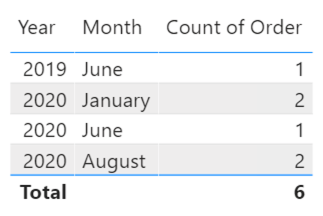
Did I answer your question? Mark my post as a solution!
Proud to be a Super User!
- Mark as New
- Bookmark
- Subscribe
- Mute
- Subscribe to RSS Feed
- Permalink
- Report Inappropriate Content
@Anonymous,
The measure below assumes one "ht_order" per customer (per the sample data). If this is not the case, let me know.
Count of Order =
SUMX (
    ALL ( Customer ),
    VAR vCustomer = Customer[customer_key]
    VAR vHTOrderRow =
        FILTER (
            ALL ( Sales ),
            Sales[customer_key] = vCustomer
                && Sales[order_type] = "ht_order"
        )
    VAR vHTOrderDate =
        MAXX ( vHTOrderRow, Sales[order_date] )
    VAR vOrderRows =
        FILTER (
            ALL ( Sales ),
            Sales[customer_key] = vCustomer
                && Sales[order_type] = "order"
                && Sales[order_date] <= vHTOrderDate + 30
        )
    RETURN
        COUNTROWS ( vOrderRows )
)
Did I answer your question? Mark my post as a solution!
Proud to be a Super User!
- Mark as New
- Bookmark
- Subscribe
- Mute
- Subscribe to RSS Feed
- Permalink
- Report Inappropriate Content
Thanks for the solution and great reply!
@DataInsightswould it be possible to tweak the formula to be based on 3 tables instead of only 2 (realized that I have the date in a separately table). In that case, this is the example data:
Sales table
| customer_key | date_key | order_number | order_type | sales |
| 123 | 20200101 | 1001 | ht_order | 10 |
| 123 | 20200120 | 1020 | order | 150 |
| 124 | 20191010 | 1100 | ht_order | 10 |
| 124 | 20191210 | 1200 | order | 140 |
| 125 | 20200111 | 1201 | ht_order | 10 |
| 125 | 20200115 | 1202 | order | 130 |
| 126 | 20200202 | 1205 | order | 110 |
| 127 | 20200310 | 1206 | ht_order | 10 |
| 128 | 20200517 | 1207 | ht_order | 10 |
| 129 | 20190610 | 1208 | ht_order | 10 |
| 129 | 20190622 | 1209 | order | 180 |
| 130 | 20200604 | 1210 | ht_order | 10 |
| 130 | 20200613 | 1211 | order | 120 |
| 130 | 20200913 | 1212 | order | 150 |
| 131 | 20200315 | 1213 | ht_order | 10 |
| 131 | 20200515 | 1005 | order | 130 |
| 132 | 20200801 | 1215 | ht_order | 10 |
| 132 | 20200805 | 1220 | order | 120 |
| 132 | 20200808 | 1225 | order | 130 |
Customer Table
| CUSTOMER_KEY | CUSTOMER_EMAIL |
| 123 | [email protected] |
| 124 | [email protected] |
| 125 | [email protected] |
| 126 | [email protected] |
| 127 | [email protected] |
| 128 | [email protected] |
| 129 | [email protected] |
| 130 | [email protected] |
| 131 | [email protected] |
| 132 | [email protected] |
Date Table
| date_key | full_date | weekday_number | ios_week |
| 20200101 | 2020-01-01 | 3 | 1 |
| 20200120 | 2020-01-20 | 1 | 4 |
| 20191010 | 2019-10-10 | 4 | 41 |
| 20191210 | 2019-12-10 | 2 | 50 |
| 20200111 | 2020-01-11 | 6 | 2 |
| 20200115 | 2020-01-15 | 3 | 3 |
| 20200202 | 2020-02-02 | 7 | 5 |
| 20200310 | 2020-03-10 | 2 | 11 |
| 20200517 | 2020-05-17 | 7 | 20 |
| 20190610 | 2019-06-10 | 1 | 24 |
| 20190622 | 2019-06-22 | 6 | 25 |
| 20200604 | 2020-06-04 | 4 | 23 |
| 20200613 | 2020-06-13 | 6 | 24 |
| 20200913 | 2020-09-13 | 7 | 37 |
| 20200315 | 2020-03-15 | 7 | 11 |
| 20200515 | 2020-05-15 | 5 | 20 |
| 20200801 | 2020-08-01 | 6 | 31 |
| 20200805 | 2020-08-05 | 3 | 32 |
| 20200808 | 2020-08-08 | 6 | 32 |
Big thanks in advance!
- Mark as New
- Bookmark
- Subscribe
- Mute
- Subscribe to RSS Feed
- Permalink
- Report Inappropriate Content
@Anonymous,
See the revised measure below. This requires a relationship between the Sales table and Date table.
Count of Order =
SUMX (
    ALL ( Customer ),
    VAR vCustomer = Customer[customer_key]
    VAR vHTOrderRow =
        FILTER (
            ALL ( Sales ),
            Sales[customer_key] = vCustomer
                && Sales[order_type] = "ht_order"
        )
    VAR vHTOrderDate =
        MAXX ( vHTOrderRow, Sales[date_key] )
    VAR vOrderRows =
        FILTER (
            ALL ( Sales ),
            Sales[customer_key] = vCustomer
                && Sales[order_type] = "order"
                && Sales[date_key] <= vHTOrderDate + 30
        )
    RETURN
        COUNTROWS ( vOrderRows )
)
Did I answer your question? Mark my post as a solution!
Proud to be a Super User!
- Mark as New
- Bookmark
- Subscribe
- Mute
- Subscribe to RSS Feed
- Permalink
- Report Inappropriate Content
- Mark as New
- Bookmark
- Subscribe
- Mute
- Subscribe to RSS Feed
- Permalink
- Report Inappropriate Content
@Anonymous,
Would you be able to attach screenshots of the data model, visual, and slicers?
Did I answer your question? Mark my post as a solution!
Proud to be a Super User!
- Mark as New
- Bookmark
- Subscribe
- Mute
- Subscribe to RSS Feed
- Permalink
- Report Inappropriate Content
Hi!
I think it sholud be more correct to use ALL as filter, right? This since we would like to include order_type "ht_order" also outside selected period of time?
Yes, I did a try on the example data so please have a look.

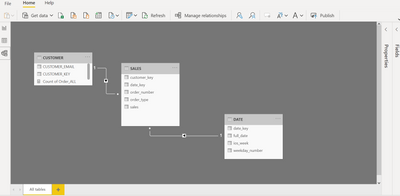
Thanks for helping!
- Mark as New
- Bookmark
- Subscribe
- Mute
- Subscribe to RSS Feed
- Permalink
- Report Inappropriate Content
@Anonymous,
Try this. I revised the logic to work at both the total level and the year/month level.
Count of Order =
SUMX (
    ALL ( Customer ),
    VAR vCustomer = Customer[customer_key]
    VAR vHTOrderRow =
        FILTER (
            ALL ( Sales ),
            Sales[customer_key] = vCustomer
                && Sales[order_type] = "ht_order"
        )
    VAR vHTOrderDate =
        MAXX ( vHTOrderRow, Sales[date_key] )
    VAR vCountOrderRows =
        CALCULATE (
            COUNTROWS ( Sales ),
            Sales[customer_key] = vCustomer,
            Sales[order_type] = "order",
            Sales[date_key] <= vHTOrderDate + 30
        )
    RETURN
        vCountOrderRows
)
Did I answer your question? Mark my post as a solution!
Proud to be a Super User!
- Mark as New
- Bookmark
- Subscribe
- Mute
- Subscribe to RSS Feed
- Permalink
- Report Inappropriate Content
Hi again,
@DataInsights I have two relationships in place (customer_key and date_key), both with cardinality "Many to one".
When trying the formula below I get an error since it show me Count of Order = 6 - no matter what date I select.
Any suggestions on whats being wrong?
Thanks!
- Mark as New
- Bookmark
- Subscribe
- Mute
- Subscribe to RSS Feed
- Permalink
- Report Inappropriate Content
@Anonymous,
Try this:
Count of Order =
SUMX (
    ALL ( Customer ),
    VAR vCustomer = Customer[customer_key]
    VAR vHTOrderRow =
        FILTER (
            ALLSELECTED ( Sales ),
            Sales[customer_key] = vCustomer
                && Sales[order_type] = "ht_order"
        )
    VAR vHTOrderDate =
        MAXX ( vHTOrderRow, Sales[date_key] )
    VAR vOrderRows =
        FILTER (
            ALLSELECTED ( Sales ),
            Sales[customer_key] = vCustomer
                && Sales[order_type] = "order"
                && Sales[date_key] <= vHTOrderDate + 30
        )
    RETURN
        COUNTROWS ( vOrderRows )
)
Did I answer your question? Mark my post as a solution!
Proud to be a Super User!
Helpful resources

Data Days 2026
Don't miss out on Data Days, June 15 through August 7. Learn Fabric, Power BI, SQL, AI and more.

Power BI DataViz World Championships - June 2026
A new Power BI DataViz World Championship is coming this June! Don't miss out on submitting your entry.

| User | Count |
|---|---|
| 22 | |
| 22 | |
| 20 | |
| 19 | |
| 11 |


| User | Count |
|---|---|
| 65 | |
| 54 | |
| 46 | |
| 44 | |
| 31 |


