cancel
Showing results for 
Search instead for 
Did you mean: 

The Power BI Data Visualization World Championships is back! Get ahead of the game and start preparing now! Learn more

Reply
mumair
Helper I
Helper I

Help with not double counting

My data looks like the following:


Shipment | Voyage | Product | Failed Tanks | Count of Failed Tanks

1000 | NA100 | A | 3D, 3E | 2

1001 | NA100 | A | 3D, 3E | 2

1002 | NA100 | A | 3D, 3E | 2

2000 | NA200 | A | 1S, 1P | 2

2001 | NA200 | B | 2S | 1

3000 | NA300 | A | N/A | 0


I want the number of failed tanks by voyage, so ideally the output would look something like the following:


Voyage | Count of Failed Tanks by Voyage

NA100 | 2

NA200 | 3

NA300 | 0


Could someone show me a way to do this please?

2 REPLIES 2
Eric_Zhang
Microsoft Employee
Microsoft Employee

@mumair

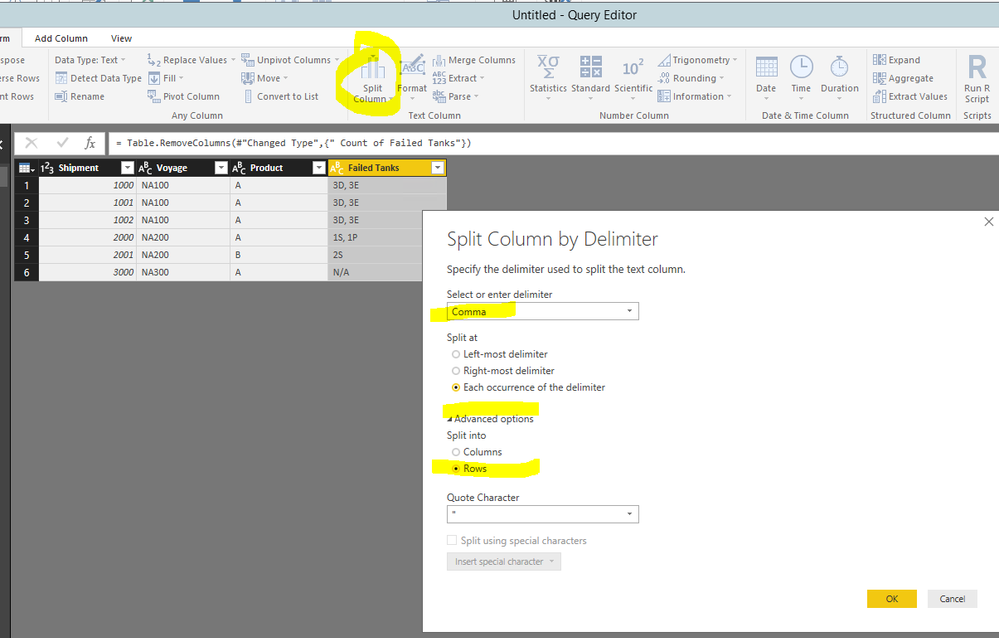
You'll need to re-model the dataset.


Capture.PNG

Capture2.PNG


Then create a measure like

Count of Failed Tanks by Voyage = 
VAR cnt =
    CALCULATE (
        DISTINCTCOUNT ( yourTable[Failed Tanks] ),
        FILTER ( yourTable, yourTable[Failed Tanks] <> "N/A" )
    )
RETURN
    IF ( ISBLANK ( cnt ), 0, cnt )

Capture.PNG

MattAllington
Community Champion
Community Champion

=calculate(countrows(tablename),tablename[failed tanks]<>"N/A")


* Matt is an 8 times Microsoft MVP (Power BI) and author of the Power BI Book Supercharge Power BI.
I will not give you bad advice, even if you unknowingly ask for it.

Helpful resources

Announcements
Power BI DataViz World Championships

Power BI Dataviz World Championships

The Power BI Data Visualization World Championships is back! Get ahead of the game and start preparing now!

December 2025 Power BI Update Carousel

Power BI Monthly Update - December 2025

Check out the December 2025 Power BI Holiday Recap!

FabCon Atlanta 2026 carousel

FabCon Atlanta 2026

Join us at FabCon Atlanta, March 16-20, for the ultimate Fabric, Power BI, AI and SQL community-led event. Save $200 with code FABCOMM.