cancel
Showing results for 
Search instead for 
Did you mean: 

The Power BI Data Visualization World Championships is back! It's time to submit your entry. Live now!

Reply
mumair
Helper I
Helper I

Help with not double counting

My data looks like the following:


Shipment | Voyage | Product | Failed Tanks | Count of Failed Tanks

1000 | NA100 | A | 3D, 3E | 2

1001 | NA100 | A | 3D, 3E | 2

1002 | NA100 | A | 3D, 3E | 2

2000 | NA200 | A | 1S, 1P | 2

2001 | NA200 | B | 2S | 1

3000 | NA300 | A | N/A | 0


I want the number of failed tanks by voyage, so ideally the output would look something like the following:


Voyage | Count of Failed Tanks by Voyage

NA100 | 2

NA200 | 3

NA300 | 0


Could someone show me a way to do this please?

2 REPLIES 2
Eric_Zhang
Microsoft Employee
Microsoft Employee

@mumair

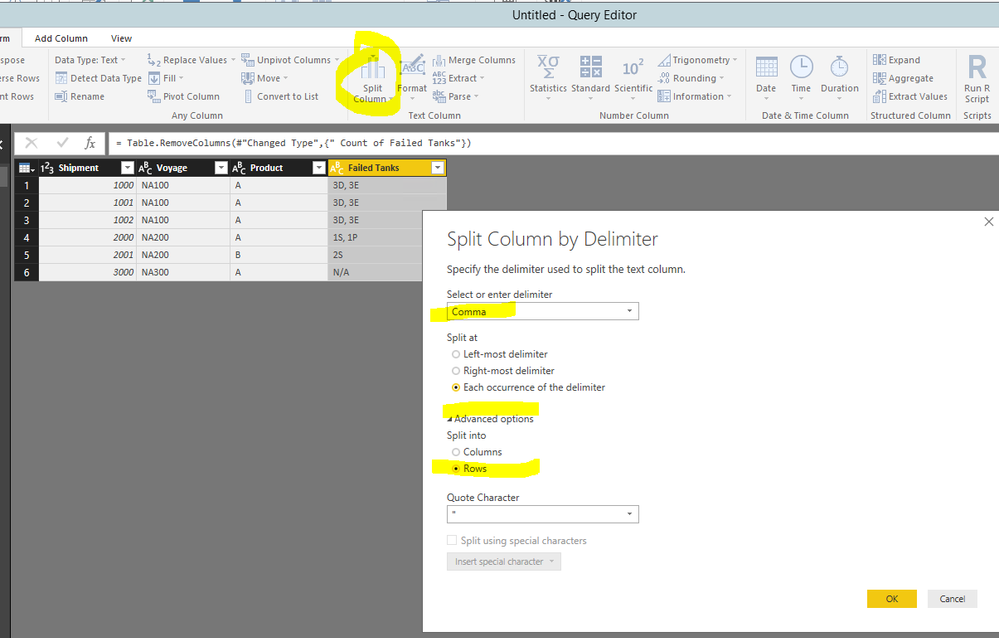
You'll need to re-model the dataset.


Capture.PNG

Capture2.PNG


Then create a measure like

Count of Failed Tanks by Voyage = 
VAR cnt =
    CALCULATE (
        DISTINCTCOUNT ( yourTable[Failed Tanks] ),
        FILTER ( yourTable, yourTable[Failed Tanks] <> "N/A" )
    )
RETURN
    IF ( ISBLANK ( cnt ), 0, cnt )

Capture.PNG

MattAllington
Community Champion
Community Champion

=calculate(countrows(tablename),tablename[failed tanks]<>"N/A")


* Matt is an 8 times Microsoft MVP (Power BI) and author of the Power BI Book Supercharge Power BI.
I will not give you bad advice, even if you unknowingly ask for it.

Helpful resources

Announcements
FabCon Atlanta 2026 carousel

FabCon Atlanta 2026

Join us at FabCon Atlanta, March 16-20, for the ultimate Fabric, Power BI, AI and SQL community-led event. Save $200 with code FABCOMM.