Join us at FabCon Atlanta from March 16 - 20, 2026, for the ultimate Fabric, Power BI, AI and SQL community-led event. Save $200 with code FABCOMM.
Register now!The Power BI Data Visualization World Championships is back! It's time to submit your entry. Live now!
I have a fairly simple requirement which I can't find a solution to:
I want to see the sum of document value, over a large list of transactions, split by project code. They want 4 columns:
a) Project Code
b) Sum of Doc Value for a chosen period (or multiple periods - this is important)
c) Sum of Doc Value for another chosen period (or multiple)
d) The movement/delta between b) and c) (c minus b)
I've tried all sorts of solutions, the closest I got was curbal's "VALUES IN var" method shown at the end of this video - but it just isn't working for some reason: https://www.youtube.com/watch?v=_k_Qxb6pyCc
It seems to be calculating doc value across all time periods, regardless of what period/s I choose
I've got 2 disconnected 'Period' tables/slicers - one for column b) and c) and have tried the following measure (for column b):
Period 1 Value =
VAR p1_selection =
ALLSELECTED ( 'Period 1'[StartDate] )
RETURN
CALCULATE (
[Doc Value],
FILTER (
'dwh TransactionLineItem',
'dwh TransactionLineItem'[Period Start Date] IN p1_selection
)
)The idea behind this was that the user would select a period/s for column B in slicer B, and do the same for column C and slicer C, and the table would show project codes that had transactions in EITHER of the periods. I've got it working for if the user can only select one-period using a SELECTEDVALUE() solution, but now need to extend it out to multiple slicer selections, which led me to Curbal's video.
Can anyone point me in the right direction? I've posted a simple dataset showing how the data is structured
Solved! Go to Solution.
Hi @Anonymous ,
We can create two transaction period table and create two slicers using them to meet your requirement.
1. Create two period tables that just contain transaction period column.
Table 2 = DISTINCT('Table'[transaction period])
Table 3 = DISTINCT('Table'[transaction period])
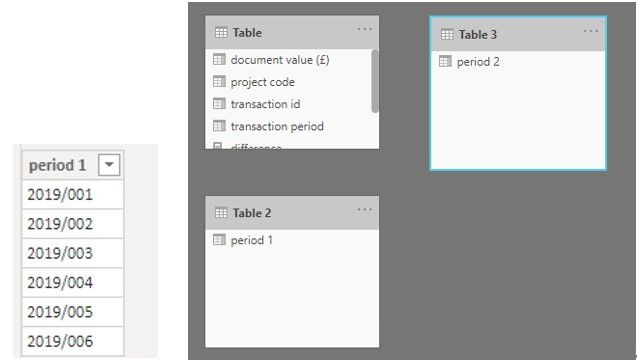
2. Then we can create two measures, one calculates the sum of document value based on slicer 1, another bases on slicer 2.
Measure =
var selected_value = ALLSELECTED('Table 2'[period 1])
return
CALCULATE(SUM('Table'[document value (£)]),FILTER('Table','Table'[transaction period] in selected_value))
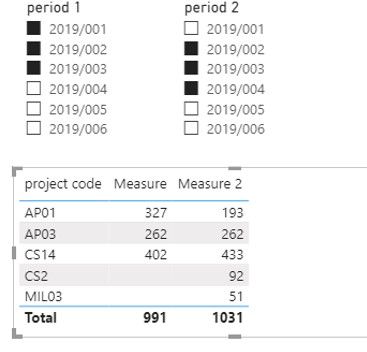
Measure 2 =
var selected_value = ALLSELECTED('Table 3'[period 2])
return
CALCULATE(SUM('Table'[document value (£)]),FILTER('Table','Table'[transaction period] in selected_value))
3. At last we can create a measure to calculate the difference between [Measure 1] and [Measure 2].
difference = [Measure 2] - [Measure]
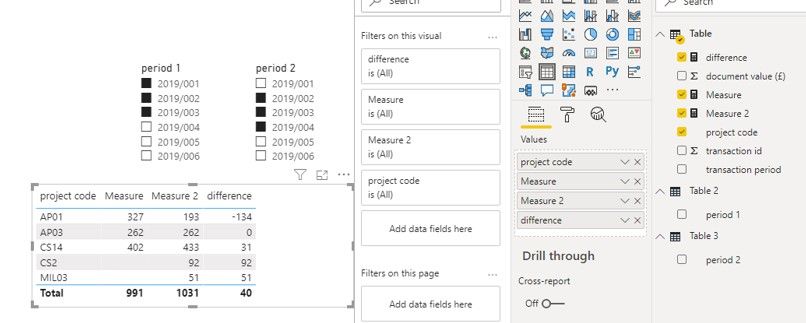
If it doesn’t meet your requirement, could you please show the exact expected result based on the table that you have shared?
BTW, pbix as attached.
Best regards,
Community Support Team _ zhenbw
If this post helps, then please consider Accept it as the solution to help the other members find it more quickly.
Hi @Anonymous ,
We can create two transaction period table and create two slicers using them to meet your requirement.
1. Create two period tables that just contain transaction period column.
Table 2 = DISTINCT('Table'[transaction period])
Table 3 = DISTINCT('Table'[transaction period])
2. Then we can create two measures, one calculates the sum of document value based on slicer 1, another bases on slicer 2.
Measure =
var selected_value = ALLSELECTED('Table 2'[period 1])
return
CALCULATE(SUM('Table'[document value (£)]),FILTER('Table','Table'[transaction period] in selected_value))
Measure 2 =
var selected_value = ALLSELECTED('Table 3'[period 2])
return
CALCULATE(SUM('Table'[document value (£)]),FILTER('Table','Table'[transaction period] in selected_value))
3. At last we can create a measure to calculate the difference between [Measure 1] and [Measure 2].
difference = [Measure 2] - [Measure]
If it doesn’t meet your requirement, could you please show the exact expected result based on the table that you have shared?
BTW, pbix as attached.
Best regards,
Community Support Team _ zhenbw
If this post helps, then please consider Accept it as the solution to help the other members find it more quickly.
The Power BI Data Visualization World Championships is back! It's time to submit your entry.
Check out the January 2026 Power BI update to learn about new features.
| User | Count |
|---|---|
| 60 | |
| 49 | |
| 30 | |
| 25 | |
| 23 |
| User | Count |
|---|---|
| 131 | |
| 103 | |
| 58 | |
| 39 | |
| 31 |