cancel
Showing results for 
Search instead for 
Did you mean: 

The Power BI Data Visualization World Championships is back! Get ahead of the game and start preparing now! Learn more

Reply
Maria9292
Helper II
Helper II

Help with measure bucketing for charts

Hi!


I need to group measures and I decided to do it by creating calculated columns to be able to add them on axis of a barchart. When creating a second column, I get a Circular dependency mistake. 

 Measure 1:

Age = VAR Chosen_Date = MAX(Date_General[Date])
VAR BDay= MAX(Append_Staff_data[DOB])
RETURN
(Chosen_Date - BDay)/365
 
Column to group results:
 
Age_Group = IF([Age]<25, "< 25", IF([Age]<35, "25 - 34", IF([Age]<45, "35 - 44", IF([Age]<55, "45 - 54", IF([Age]<65, "55 - 64", IF([Age]<75, "65 - 74"))))))
 
 
Measure 2:
Years_in_Company = VAR Chosen_Date_2 = MAX(Date_General[Date])
VAR Start_Date = MAX(Append_Staff_data[Employment_start_date])
RETURN
(Chosen_Date_2 - Start_Date)/365
 
Column to group the values:
 
Years_in_Company_Group = IF([Years_in_Company]<1, "< 1", IF([Years_in_Company]<2, "1 - 2", IF([Years_in_Company]<4, "2-4", IF([Years_in_Company]<6, "4-6", IF([Years_in_Company]<10, "6-10", IF([Years_in_Company]<15, "10-15 лет", IF([Years_in_Company]>=15, "15 - ...")))))))
 
How to avoid the mistake?
Thank you!
Maria
1 ACCEPTED SOLUTION

Hi @Maria9292 ,


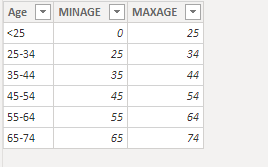
You can create the following table for slicer:


Capture1.PNG


Then use the following measure in your measure:


Head_Count =
CALCULATE (
    DISTINCTCOUNT ( Staff_data[ID] ),
    FILTER (
        Staff_data,
         (
            Staff_data[start_date] <= MAX ( Date[Date] )
                && Staff_data[end_date] >= MAX ( Date[Date] )
        )
            || (
                Staff_data[start_date] <= MAX ( Date[Date] )
                    && ISBLANK ( Staff_data[end_date] )
            )
    ),
    FILTER (
        Staff_data,
        [Age] >= MAX ( Table[MINAGE] )
            && [Age] <= MAX ( Table[MAXAGE] )
    )
)


If this post helps, then please consider Accept it as the solution to help the other members find it more quickly.


Best Regards,

Dedmon Dai

View solution in original post

4 REPLIES 4
amitchandak
Super User
Super User

@Maria9292 , Are you trying to use a measure in a column. That will not work.

After measure for bucketing, you need to use the independent table


Refer to my video

https://youtu.be/CuczXPj0N-k

or

https://www.daxpatterns.com/dynamic-segmentation/
https://radacad.com/grouping-and-binning-step-towards-better-data-visualization

also refer this circular dependency

https://www.sqlbi.com/articles/avoiding-circular-dependency-errors-in-dax/

Share with Power BI Enthusiasts: Full Power BI Video (20 Hours) YouTube
Microsoft Fabric Series 60+ Videos YouTube
Microsoft Fabric Hindi End to End YouTube

Thanks @amitchandak

I watched the video, and it almost what I need, except I need somehow to use this measure instead of ID (in your video it was customer id):

Head_Count =

CALCULATE (
DISTINCTCOUNT(Staff_data[ID]),
FILTER (Staff_data,
(Staff_data[start_date] <= MAX ( Date [Date] )
&& Staff_data[end_date] >= MAX ( Date [Date] )
)
|| (Staff_data[start_date] <= MAX ( Date[Date] )
&& ISBLANK ( Staff_data[end_date])
)))

I need for number of employees to change (thus the measure above), for their age to change (thus the age is also a measure like Date[Date] - DOB) depending on the date chosen and the employees' age to fall into the correct bucket.

Appreciate any help.


Hi @Maria9292 ,


You can create the following table for slicer:


Capture1.PNG


Then use the following measure in your measure:


Head_Count =
CALCULATE (
    DISTINCTCOUNT ( Staff_data[ID] ),
    FILTER (
        Staff_data,
         (
            Staff_data[start_date] <= MAX ( Date[Date] )
                && Staff_data[end_date] >= MAX ( Date[Date] )
        )
            || (
                Staff_data[start_date] <= MAX ( Date[Date] )
                    && ISBLANK ( Staff_data[end_date] )
            )
    ),
    FILTER (
        Staff_data,
        [Age] >= MAX ( Table[MINAGE] )
            && [Age] <= MAX ( Table[MAXAGE] )
    )
)


If this post helps, then please consider Accept it as the solution to help the other members find it more quickly.


Best Regards,

Dedmon Dai

@v-deddai1-msft Thank you! 😄 That's excactly what I needed!

Helpful resources

Announcements
Power BI DataViz World Championships

Power BI Dataviz World Championships

The Power BI Data Visualization World Championships is back! Get ahead of the game and start preparing now!

November Power BI Update Carousel

Power BI Monthly Update - November 2025

Check out the November 2025 Power BI update to learn about new features.

FabCon Atlanta 2026 carousel

FabCon Atlanta 2026

Join us at FabCon Atlanta, March 16-20, for the ultimate Fabric, Power BI, AI and SQL community-led event. Save $200 with code FABCOMM.