cancel
Showing results for 
Search instead for 
Did you mean: 

Vote for your favorite vizzies from the Power BI Dataviz World Championship submissions. Vote now!

Reply
Anonymous
Not applicable

Help with grouping modified date into today, yesterday etc.

Sorry if I've already posted this but can't find my original post!


I'm trying to group my datetime column "modify time" so it contains data like this:


New column name: Last Modified

Today: 4

Yesterday: 7

2 days ago: 3

3 days ago: 4


I have the datetime column but I also have "Modified Date" which is a date column to work with.


I'm struggling with the statement, I assume I want something like this:


IF [Modified Date] =  TODAY THEN "Today" ELSE IF [Modified Date] > TODAY -1 AND < TODAY THEN "Yesterday" etc.


Any help would be greatly appreciated!

1 ACCEPTED SOLUTION
Anonymous
Not applicable

Not sure if it's the most elegant solution but I went with this in the end:


Last Modified =
IF('sysaid'[Modified Date]=TODAY(),"0 Days",
IF('sysaid'[Modified Date]= TODAY()-1,"1 Day Ago",
IF('sysaid'[Modified Date]= TODAY()-2, "2 Days Ago",
IF('sysaid'[Modified Date]= TODAY()-3, "3 Days Ago",
IF('sysaid'[Modified Date]= TODAY()-4, "4 Days Ago",
IF('sysaid'[Modified Date]= TODAY()-5, "5 Days Ago",
IF('sysaid'[Modified Date]= TODAY()-6, "6 Days Ago",
IF( 'sysaid'[Modified Date] <= TODAY()-7, "Over A Week") )))))))

View solution in original post

4 REPLIES 4
amitchandak
Super User
Super User

@Anonymous , In you date table create a column like this

Date Type = SWITCH(TRUE(),'Date'[Date]=TODAY(),"Today"
,'Date'[Date]=TODAY()-1,"Yesterday"
,'Date'[Date]=TODAY()-2,"2 Days Ago"
,'Date'[Date]&"")

Sort it on Date


Join it date of date table with date of your table


Share with Power BI Enthusiasts: Full Power BI Video (20 Hours) YouTube
Microsoft Fabric Series 60+ Videos YouTube
Microsoft Fabric Hindi End to End YouTube
Anonymous
Not applicable

@amitchandak  Thank you, I think this would only work if I was to continue with 3,4,5,6 days etc. but I'd like to expand the range the older the data is so for example last week, last month which I don't think can be done with a switch? I'd need to use an IF statement to achieve this- Is that correct?

Hi @Anonymous ,


Try to create the column.

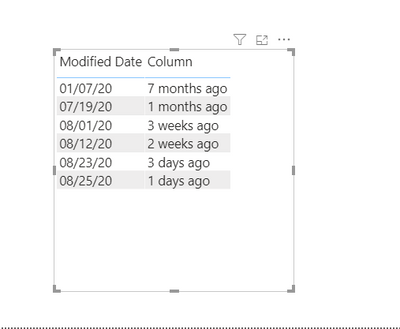
Column = var diff = DATEDIFF('Table (2)'[Modified Date],TODAY(),DAY)
return SWITCH(TRUE(),
            diff<7,diff&" days ago",
            7<=diff&&diff<30,TRUNC(diff/7)&" weeks ago",
            diff>=30,TRUNC(diff/30)&" months ago")

V-lianl-msft_0-1598422563362.png


Best Regards,
Liang
If this post helps, then please consider Accept it as the solution to help the other members find it more quickly.

Anonymous
Not applicable

Not sure if it's the most elegant solution but I went with this in the end:


Last Modified =
IF('sysaid'[Modified Date]=TODAY(),"0 Days",
IF('sysaid'[Modified Date]= TODAY()-1,"1 Day Ago",
IF('sysaid'[Modified Date]= TODAY()-2, "2 Days Ago",
IF('sysaid'[Modified Date]= TODAY()-3, "3 Days Ago",
IF('sysaid'[Modified Date]= TODAY()-4, "4 Days Ago",
IF('sysaid'[Modified Date]= TODAY()-5, "5 Days Ago",
IF('sysaid'[Modified Date]= TODAY()-6, "6 Days Ago",
IF( 'sysaid'[Modified Date] <= TODAY()-7, "Over A Week") )))))))

Helpful resources

Announcements
Power BI DataViz World Championships

Power BI Dataviz World Championships

Vote for your favorite vizzies from the Power BI World Championship submissions!

Sticker Challenge 2026 Carousel

Join our Community Sticker Challenge 2026

If you love stickers, then you will definitely want to check out our Community Sticker Challenge!

January Power BI Update Carousel

Power BI Monthly Update - January 2026

Check out the January 2026 Power BI update to learn about new features.

FabCon Atlanta 2026 carousel

FabCon Atlanta 2026

Join us at FabCon Atlanta, March 16-20, for the ultimate Fabric, Power BI, AI and SQL community-led event. Save $200 with code FABCOMM.