
cancel
Showing results for 
Search instead for 
Did you mean: 

The Power BI Data Visualization World Championships is back! Get ahead of the game and start preparing now! Learn more

Reply
Anonymous
Not applicable

Help with extracting a JSON

Hi All,


So we have an applications portal where people can choose various answers and submit an application for funding.


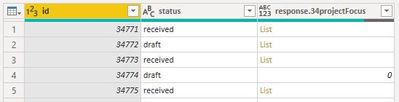
I have managed to (mostly) successfully extract the "responses" JSON into a set of columns, however there are a few where the response comes through as List.


List.JPG


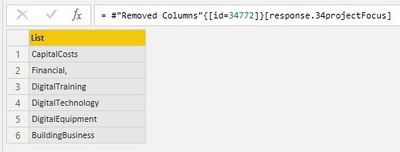
In a further complication, some entries are empty, I have rplaced some with zeroes (where an error appeared in the original extrac), and the list entries can be different sizes:

34771.JPG34772.JPG


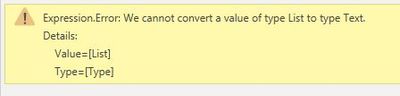
And when I try to split the column by delimiter (I've tried them all and am not certain what the delimietr actually is) it gives me an error on converting a List to Text


error.JPG


I'm out of ideas. Any suggestions?


Thanks.

1 ACCEPTED SOLUTION
Anonymous
Not applicable

Success!


Instead of replacing errors with 0, I removed them instead. I can now extract the list to individual rows and perform my calculations from there.


I'm learning!

View solution in original post

4 REPLIES 4
amitchandak
Super User
Super User

@Anonymous , Check if you have a expand icon on the column two 90 degrees angle opposite to each other. If it there uses that and expands it to row and columns using that


refer these

https://www.youtube.com/watch?v=sbPS3ZKIt7g

https://powerbi.microsoft.com/en-us/blog/how-to-expand-a-list-of-records-in-a-query/

Share with Power BI Enthusiasts: Full Power BI Video (20 Hours) YouTube
Microsoft Fabric Series 60+ Videos YouTube
Microsoft Fabric Hindi End to End YouTube
Anonymous
Not applicable

@amitchandak no, the column doesn't expand or have the expansion icons. I suspect it's because the "List" is of different lengths per record (could be anywhere from 0 to 6 list entries).

Anonymous
Not applicable

Success!


Instead of replacing errors with 0, I removed them instead. I can now extract the list to individual rows and perform my calculations from there.


I'm learning!

Hi @Anonymous ,


Glad that you have resolved it. You could accept your answer as solution. More people who have the same requirement will benefit from this thread.


Best Regards,
Xue Ding
If this post helps, then please consider Accept it as the solution to help the other members find it more quickly.

Helpful resources

Announcements
Power BI DataViz World Championships

Power BI Dataviz World Championships

The Power BI Data Visualization World Championships is back! Get ahead of the game and start preparing now!

December 2025 Power BI Update Carousel

Power BI Monthly Update - December 2025

Check out the December 2025 Power BI Holiday Recap!

FabCon Atlanta 2026 carousel

FabCon Atlanta 2026

Join us at FabCon Atlanta, March 16-20, for the ultimate Fabric, Power BI, AI and SQL community-led event. Save $200 with code FABCOMM.