cancel
Showing results for 
Search instead for 
Did you mean: 

Get Fabric Certified for FREE during Fabric Data Days. Don't miss your chance! Request now

Reply
dpotta
Resolver I
Resolver I

Help with date measure COUNTIFs in Excel in DAX

Hi 


Using a separate date table, I am trying to identify how many jobs were 'open' on any given date to plot in a bar chart.


Open is defined as where:

the StartDate is >= DateTable[Date] 

the CompleteDate <=DateTable[Date]


Can I do this in a single measure, or do I need to write multiple measures?


E,g, if the DateTable[Date] = 01/01/19 the count of OpenJobs would be 6


JobID  StartDate                     CompleteDate

201/01/2019 00:00:0011/03/2019 00:00:00
301/01/2019 00:00:0011/03/2019 00:00:00
101/01/2019 00:00:0014/01/2019 00:00:00
401/01/2019 00:00:0011/03/2019 00:00:00
501/01/2019 00:00:0011/03/2019 00:00:00
601/01/2019 00:00:0011/03/2019 00:00:00
901/02/2019 00:00:0011/02/2019 00:00:00
701/02/2019 00:00:0011/02/2019 00:00:00
801/02/2019 00:00:0011/02/2019 00:00:00
1001/02/2019 00:00:0011/02/2019 00:00:00
1101/02/2019 00:00:0011/02/2019 00:00:00
1201/02/2019 00:00:0011/02/2019 00:00:00
1301/03/2019 00:00:0011/03/2019 00:00:00
1401/03/2019 00:00:0011/03/2019 00:00:00
1501/03/2019 00:00:0011/03/2019 00:00:00
1601/03/2019 00:00:0011/03/2019 00:00:00
1701/03/2019 00:00:0011/03/2019 00:00:00
2 REPLIES 2
ryan_mayu
Super User
Super User

@dpotta 

you can try this

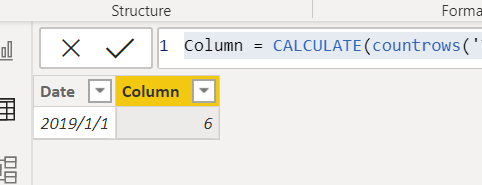
Column = CALCULATE(countrows('Table'),FILTER('Table','DateTable'[Date]>='Table'[StartDAte]&&'DateTable'[Date]<='Table'[CompleteDate]))

1.PNG


or


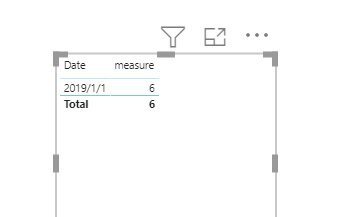
measure = CALCULATE(countrows('Table'),FILTER('Table',max('DateTable'[Date])>='Table'[StartDAte]&&max('DateTable'[Date])<='Table'[CompleteDate]))

2.PNG


Did I answer your question? Mark my post as a solution!

Proud to be a Super User!


dpotta
Resolver I
Resolver I

In Excel, I would have done something like this with a date series


= COUNTIFS(jobs[StartDate], "<="&[@Date],jobs[EndDate],">"&[@Date])


I dunno why I cannot get my head round this simple thing 


Helpful resources

Announcements
November Power BI Update Carousel

Power BI Monthly Update - November 2025

Check out the November 2025 Power BI update to learn about new features.

Fabric Data Days Carousel

Fabric Data Days

Advance your Data & AI career with 50 days of live learning, contests, hands-on challenges, study groups & certifications and more!

FabCon Atlanta 2026 carousel

FabCon Atlanta 2026

Join us at FabCon Atlanta, March 16-20, for the ultimate Fabric, Power BI, AI and SQL community-led event. Save $200 with code FABCOMM.

Top Solution Authors
Top Kudoed Authors