Share feedback directly with Fabric product managers, participate in targeted research studies and influence the Fabric roadmap.
Sign up nowGet Fabric certified for FREE! Don't miss your chance! Learn more
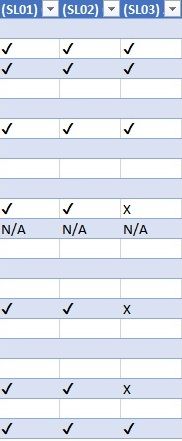
I have data that is structured like this in Power BI (obviously this is an excel screenshot)
I want to show a table summary of all the column headers as a % of x/(x+✔)
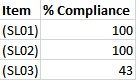
So for instance SL03 in the table above would be 43% i.e. 3/7
And display like this
Thanks for any help
Solved! Go to Solution.
@Anonymous Guess, you are looking for something like this....
Sample Data
Unpivot the columns in Power Query Editor and then your table looks like (You can see the actual tick mark symbols in Power BI, converted them using UNICODE function)
Create a summarized table as below using New Table option (Added few more fields for reference)
Test241Out = SUMMARIZECOLUMNS(
Test241SpecialSymbols[Item],"Total",COUNTROWS(Test241SpecialSymbols),
"Not NA",COUNTROWS(FILTER(Test241SpecialSymbols,Test241SpecialSymbols[Value]<>"N/A")),
"Right",COUNTROWS(FILTER(Test241SpecialSymbols,UNICODE(Test241SpecialSymbols[Value])=0252)),
"Wrong",COUNTROWS(FILTER(Test241SpecialSymbols,Test241SpecialSymbols[Value]="X"))
)
Add a new column which is your expected output and change the format to Percentage
%Compliance = Test241Out[Right]/Test241Out[Not NA]
Proud to be a PBI Community Champion
@Anonymous Guess, you are looking for something like this....
Sample Data
Unpivot the columns in Power Query Editor and then your table looks like (You can see the actual tick mark symbols in Power BI, converted them using UNICODE function)
Create a summarized table as below using New Table option (Added few more fields for reference)
Test241Out = SUMMARIZECOLUMNS(
Test241SpecialSymbols[Item],"Total",COUNTROWS(Test241SpecialSymbols),
"Not NA",COUNTROWS(FILTER(Test241SpecialSymbols,Test241SpecialSymbols[Value]<>"N/A")),
"Right",COUNTROWS(FILTER(Test241SpecialSymbols,UNICODE(Test241SpecialSymbols[Value])=0252)),
"Wrong",COUNTROWS(FILTER(Test241SpecialSymbols,Test241SpecialSymbols[Value]="X"))
)
Add a new column which is your expected output and change the format to Percentage
%Compliance = Test241Out[Right]/Test241Out[Not NA]
Proud to be a PBI Community Champion
Thankyou.
The unpivot was the key I was missing.
Really appreciate it.
If you love stickers, then you will definitely want to check out our Community Sticker Challenge!
Check out the January 2026 Power BI update to learn about new features.
| User | Count |
|---|---|
| 65 | |
| 64 | |
| 45 | |
| 21 | |
| 18 |
| User | Count |
|---|---|
| 115 | |
| 114 | |
| 38 | |
| 36 | |
| 26 |