cancel
Showing results for 
Search instead for 
Did you mean: 

Level up your Power BI skills this month - build one visual each week and tell better stories with data! Get started

Reply
Jc_16
Frequent Visitor

Help with connection

Help with API
Tuesday


Hi!!

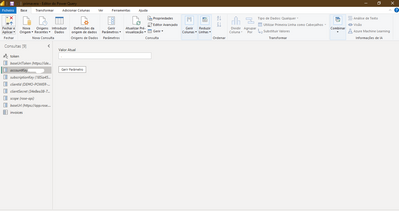
I'm actually working ina projecto to develop reports using data from an API. However, I can create a connection but the information have pagination.

I want to import all the information, but I can't develop all the code to do it automatically.

Can you help me please!!


Here is all the things I have.


Jc_16_1-1687896261932.png


code used to acces the invoices


let

    invoices = Json.Document(Web.Contents(

        baseUrl & "/api/" & accountKey & "/" & subscriptionKey & "/billing/invoices?page=1&pageSize=10",

        [

            Headers = [

                #"Content-Type"="application/x-www-form-urlencoded",

                #"Authorization"="Bearer " & token

            ]

        ]

    ))

in

    invoices[data]

1 ACCEPTED SOLUTION
v-jianboli-msft
Community Support
Community Support

Hi @Jc_16 ,


To import all the information from a paginated API, you can modify your Power Query code to loop through the pages and combine the results. Here's an example of how you can achieve this:

let

    GetPage = (page as number) =>

        let

            Source = Json.Document(Web.Contents(

                baseUrl & "/api/" & accountKey & "/" & subscriptionKey & "/billing/invoices?page=" & Text.From(page) & "&pageSize=10",

                [

                    Headers = [

                        #"Content-Type"="application/x-www-form-urlencoded",

                        #"Authorization"="Bearer " & token

                    ]

                ]

            )),

            Data = Source[data]

        in

            Data,


    CombinePages = List.Generate(

        () => [Page = 1, Data = GetPage(1)],

        each List.Count([Data]) > 0,

        each [Page = [Page] + 1, Data = GetPage([Page] + 1)],

        each [Data]

    ),


    CombinedData = List.Combine(CombinePages)

in

    CombinedData

This code defines a function GetPage that takes a page number as an argument and returns the data for that page. Then, it uses List.Generate to loop through the pages until an empty page is encountered. Finally, it combines the data from all pages into a single list using List.Combine.

Replace your existing code with this modified version, and it should import all the information from the paginated API.


Best Regards,

Jianbo Li

If this post helps, then please consider Accept it as the solution to help the other members find it more quickly.

View solution in original post

2 REPLIES 2
Jc_16
Frequent Visitor

Hi,


I used the code, however, I tried the solution presented by @SisterRay and the number of rows returnes are diferent.

With your code I have 960 rows, and with de code below I have 1050.


let
// Set the initial page number and page size
pageNumber = 1,
pageSize = 10,

// Define a helper function to fetch invoices for a specific page
fetchInvoices = (page) =>
let
// Generate the URL for the current page
url = baseUrl & "/api/" & accountKey & "/" & subscriptionKey & "/billing/invoices?page=" & Text.From(page) & "&pageSize=" & Text.From(pageSize),

// Fetch the invoices for the current page
invoices = Json.Document(Web.Contents(url, [
Headers = [
#"Content-Type"="application/x-www-form-urlencoded",
#"Authorization"="Bearer " & token
]
])),

// Extract the 'data' field from the fetched invoices
invoiceData = invoices[data]
in
invoiceData,

// Initialize an empty list to store all invoices
allInvoices = List.Combine(List.Generate(() =>
[page = pageNumber, invoices = fetchInvoices(pageNumber)],
each List.Count([invoices]) > 0,
each [
page = [page] + 1,
invoices = fetchInvoices([page])
],
each [invoices]
))
in
allInvoices

v-jianboli-msft
Community Support
Community Support

Hi @Jc_16 ,


To import all the information from a paginated API, you can modify your Power Query code to loop through the pages and combine the results. Here's an example of how you can achieve this:

let

    GetPage = (page as number) =>

        let

            Source = Json.Document(Web.Contents(

                baseUrl & "/api/" & accountKey & "/" & subscriptionKey & "/billing/invoices?page=" & Text.From(page) & "&pageSize=10",

                [

                    Headers = [

                        #"Content-Type"="application/x-www-form-urlencoded",

                        #"Authorization"="Bearer " & token

                    ]

                ]

            )),

            Data = Source[data]

        in

            Data,


    CombinePages = List.Generate(

        () => [Page = 1, Data = GetPage(1)],

        each List.Count([Data]) > 0,

        each [Page = [Page] + 1, Data = GetPage([Page] + 1)],

        each [Data]

    ),


    CombinedData = List.Combine(CombinePages)

in

    CombinedData

This code defines a function GetPage that takes a page number as an argument and returns the data for that page. Then, it uses List.Generate to loop through the pages until an empty page is encountered. Finally, it combines the data from all pages into a single list using List.Combine.

Replace your existing code with this modified version, and it should import all the information from the paginated API.


Best Regards,

Jianbo Li

If this post helps, then please consider Accept it as the solution to help the other members find it more quickly.

Helpful resources

Announcements
April Power BI Update Carousel

Power BI Monthly Update - April 2026

Check out the April 2026 Power BI update to learn about new features.

Fabric SQL PBI Data Days

Data Days 2026 coming soon!

Sign up to receive a private message when registration opens and key events begin.

New to Fabric survey Carousel

New to Fabric Survey

If you have recently started exploring Fabric, we'd love to hear how it's going. Your feedback can help with product improvements.

Power BI DataViz World Championships carousel

Power BI DataViz World Championships - June 2026

A new Power BI DataViz World Championship is coming this June! Don't miss out on submitting your entry.