Don't miss your chance to take the Fabric Data Engineer (DP-600) exam for FREE! Find out how by attending the DP-600 session on April 23rd (pacific time), live or on-demand.
Learn moreNext up in the FabCon + SQLCon recap series: The roadmap for Microsoft SQL and Maximizing Developer experiences in Fabric. All sessions are available on-demand after the live show. Register now
Hello,
I need to perform a difficult calculation on my model and I can not seem to find the answer to this.
The context is:
Every month I have a total cost, but I have a limit on how much I can pay, if the cost exceeds this limit I have to carry the difference to next month.
The problem is that this calculation is giving me the circular reference problem.
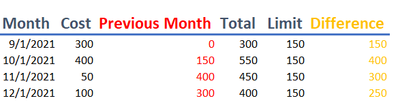
Illustration of the problem:
The problem is that the current red row references the previous orange row, which references the previous red row, I have no idea of how to solve this issue on power bi.
Can anyone help me?
Solved! Go to Solution.
Hi @Anonymous
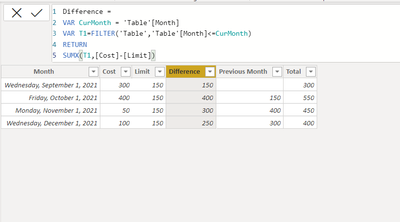
What are your original columns? I got Month, Cost, Limit only, then 3 Calculated columns
Difference =
VAR CurMonth = 'Table'[Month]
VAR T1=FILTER('Table','Table'[Month]<=CurMonth)
RETURN
SUMX(T1,[Cost]-[Limit])
Previous Month =
MAXX(FILTER('Table','Table'[Month]=EDATE( EARLIER('Table'[Month]),-1)),[Difference])
Total = [Cost]+[Previous Month]
Hi @Anonymous
What are your original columns? I got Month, Cost, Limit only, then 3 Calculated columns
Difference =
VAR CurMonth = 'Table'[Month]
VAR T1=FILTER('Table','Table'[Month]<=CurMonth)
RETURN
SUMX(T1,[Cost]-[Limit])
Previous Month =
MAXX(FILTER('Table','Table'[Month]=EDATE( EARLIER('Table'[Month]),-1)),[Difference])
Total = [Cost]+[Previous Month]
Works perfectly! I just included an if statement on the difference to yield '0' if negative, this way we won't accumulate negative values at the difference.
If you have the time, could you explain to me why this works ??
I was trying using Calculate(sum(difference, Filter (previous month)) and it was not working, giving the circular error
Hi @Anonymous
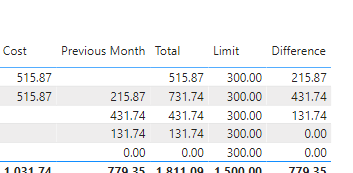
I don't have enough context to understand how you calculated all the values, are they all DAX Calculated columns or measures? Have you checked if there is certain value like referencing each other?
If you have recently started exploring Fabric, we'd love to hear how it's going. Your feedback can help with product improvements.
A new Power BI DataViz World Championship is coming this June! Don't miss out on submitting your entry.
Share feedback directly with Fabric product managers, participate in targeted research studies and influence the Fabric roadmap.
| User | Count |
|---|---|
| 48 | |
| 43 | |
| 39 | |
| 19 | |
| 17 |
| User | Count |
|---|---|
| 68 | |
| 63 | |
| 31 | |
| 30 | |
| 23 |