Join us at FabCon Atlanta from March 16 - 20, 2026, for the ultimate Fabric, Power BI, AI and SQL community-led event. Save $200 with code FABCOMM.
Register now!The Power BI Data Visualization World Championships is back! Get ahead of the game and start preparing now! Learn more
Hello,
I am doing a project on employees, determining overtime meals $ submitted vs overtime meals $ allowed (based on work hours). Then looking to calculate the discrepancy (allowed minus submitted"
I have about 10 employees in my data set.
Please help. Thanks
https://1drv.ms/u/s!ArT_qUJ3u_OibfLftPt85oq6Cu8?e=RUvgxB
Solved! Go to Solution.
Hi @thx ,
I will do one thing, Can please take
Distinct employee or just summarize the separate table
for unique employee code .
post that fix over all 8 hrs per day wise count.
else. you can concatenate the EMP & Date, by the way you can have it unquie count. $25.
Dax.
Test =
VAR _V1 = CONCATENATE ( EMP , DATE)
RETURN
CALCULATE ( SUM ( #hrs), _v1=_v1).
Can you try this way,
Thanks.
Gokul
Hi @Coryanthony ,
can you please brefly your requirement !
Then you will get update.
You wnat calculate sum or avergae. else?.
regards,
Gokul
hi Gokul,
I want to calculate the sum of $ allowed (per employee). The allowed $ is based on hours worked in that given day.
Jane smith time sheet:
Date | Units(hours) | chargecode
1/1/23 | 5hours | 40001010
1/1/23 | 3hours | 40274990
1/1/23 | 3hours | 72849999
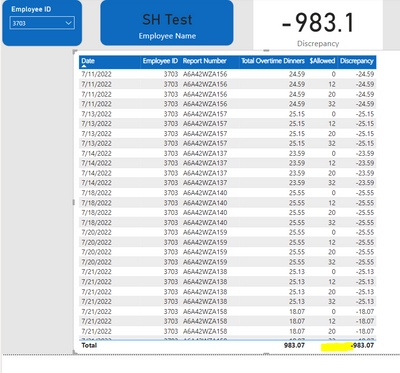
My current issue is, since the employee worked over 10 hours on 1/1/23, employee would be allowed $25 for that day. But since there are 3 rows related to 1/1/23, the allowed is showing $75 (multiplying x #rows).
thank you for your help and assistance.
i think that's what the user is saying. As I am having similar issue.
Hi @thx ,
I will do one thing, Can please take
Distinct employee or just summarize the separate table
for unique employee code .
post that fix over all 8 hrs per day wise count.
else. you can concatenate the EMP & Date, by the way you can have it unquie count. $25.
Dax.
Test =
VAR _V1 = CONCATENATE ( EMP , DATE)
RETURN
CALCULATE ( SUM ( #hrs), _v1=_v1).
Can you try this way,
Thanks.
Gokul
OMG. I am having issues related to this. Hopefully you get a response. I will piggy back off of this :).
The Power BI Data Visualization World Championships is back! Get ahead of the game and start preparing now!
| User | Count |
|---|---|
| 39 | |
| 37 | |
| 33 | |
| 32 | |
| 29 |
| User | Count |
|---|---|
| 133 | |
| 88 | |
| 85 | |
| 68 | |
| 64 |