Get certified for free when you join Fabric Data Days 2026 and dive into Fabric, Power BI, SQL, AI, and other essential data skills.
Join nowTry your skills in the Power BI Dataviz World Championship! Round one ends June 26. Join now
I have a table with the 3 first columns and want to calculate the fourth column. Which DAX-function?
| Client | Parent Client | Client Responsible | Parent Client Responsible |
| 1 | 1 | A | C |
| 2 | 1 | A | C |
| 3 | 1 | C | C |
| 4 | 4 | D | D |
| 5 | 5 | E | E |
| 6 | 8 | A | F |
| 7 | 8 | C | F |
| 8 | 8 | F | F |
| 9 | 10 | G | H |
| 10 | 10 | H | H |
Solved! Go to Solution.
Oops , mistake in copying the formula... corrected... you can check now
hi @David_1970
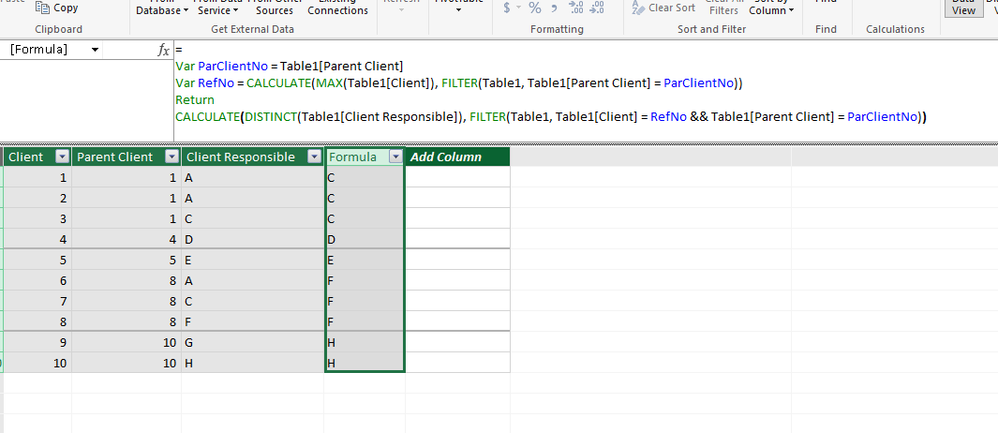
Hope the below formula does ur job
= Var ParClientNo = Table1[Parent Client] Var RefNo = CALCULATE(MAX(Table1[Client]), FILTER(Table1, Table1[Parent Client] = ParClientNo)) Return CALCULATE(DISTINCT(Table1[Client Responsible]), FILTER(Table1, Table1[Client] = RefNo && Table1[Parent Client] = ParClientNo))
thanks
First, thanks for helping me, I am a newbie when it comes to DAX but I try to learn. This Var stuff is completely new to me.
Hmm, I didn't make your formula work correctly for all client numbers in my table.
I modified the below line (and was given more accurate answers) even though I'm not sure what I actually did.
Var RefNo = CALCULATE(MAX(Table1[Client]), FILTER(Table1, Table1[Parent Client] = ParClientNo), Table1[Client])
First I removed the last argument in the CALCULATE function above, i.e. Table1[Client] because I'm not sure how it actually would do any filtering job.
Second, I changed Table1[Parent Client] = ParClientNo so it instead reads Table1[Client] = ParClientNo
Oops , mistake in copying the formula... corrected... you can check now
Your formula is perfectly correct. It was my initial table that was wrong. Very sorry for that. It should have read like this instead, i.e. Parent Client Responsible for Parent Client 1 should be A and not C, see below. Thus, the client that is the parent client determines Parent Client Responsible.
| Client | Parent Client | Client Responsible | Parent Client Responsible |
| 1 | 1 | A | A |
| 2 | 1 | A | A |
| 3 | 1 | C | A |
| 4 | 4 | D | D |
| 5 | 5 | E | E |
| 6 | 8 | A | F |
| 7 | 8 | C | F |
| 8 | 8 | F | F |
| 9 | 9 | G | G |
| 10 | 9 | H | G |
Don't miss out on Data Days, June 15 through August 7. Learn Fabric, Power BI, SQL, AI and more.
Check out the May 2026 Power BI update to learn about new features.
| User | Count |
|---|---|
| 22 | |
| 22 | |
| 21 | |
| 20 | |
| 12 |
| User | Count |
|---|---|
| 58 | |
| 55 | |
| 42 | |
| 36 | |
| 35 |