Hi Community,
Thank you Vanessa for helping with the % Lifts.
I am trying to develop a measure in which the sale price for a specific week is X cheaper than the non-promo price. I would like the non-promo price to stay static. So when a week on the bar graph is selected, it doesn't change and the formula for computing the difference in promo vs. non promo price.
Price difference = [promo price] - [non-promo price]
Other formulas that may impact:
TY Dollars = sum('LOWES Dol Sales'[Sales ($)])
- TY Non-Promo Dollars = calculate(sum('LOWES Dol Sales'[Sales ($)]),filter('LOWES Dol Sales','LOWES Dol Sales'[Promotion]="no"))
- TY Promo Dollars = calculate(sum('LOWES Dol Sales'[Sales ($)]),filter('LOWES Dol Sales','LOWES Dol Sales'[Promotion]="yes"))
Avg Promo Price = divide([TY Promo Dollars],[TY Promo Units],0)
Avg Non-Promo Price = divide([TY Non-Promo Dollars],[TY Non-Promo Units],0)
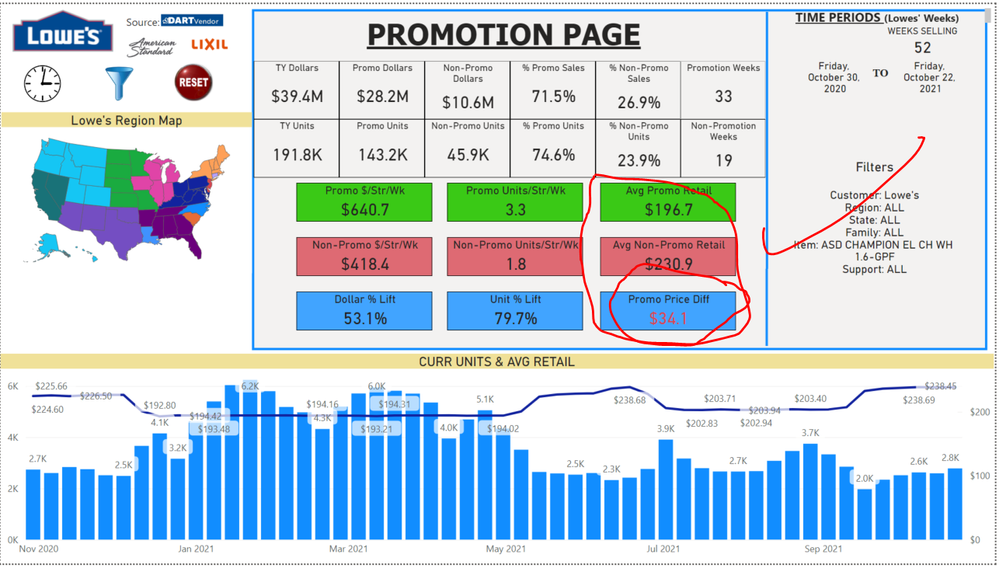 Correct when all weeks selected below
 Want to read $24.9 when any week in chart below is selected.
The second picture, I also edited the card hoping that it would keep that value when doing the price difference calculation. I have tried to use var calc, All, allexcept, filters on the price measures and the difference, but nothing changes.
I am guessing the calculation is more complicated that I thought - maybe requires multiple measures aside from what I have already. Var calc or AverageX can solve it? Any thoughts? Thank you in advance.


