cancel
Showing results for 
Search instead for 
Did you mean: 

The Power BI Data Visualization World Championships is back! Get ahead of the game and start preparing now! Learn more

Reply
RichardJ
Responsive Resident
Responsive Resident

Help with Syntax for TSQL Query Parameter

Hi,

I have a query which works ok


Declare @WorkflowName NVARCHAR(100)
Set @WorkflowName = 'Design Alpha'
--Set @WorkflowName = '" & Workflow_Names & "'

Select 
WorkflowID,
@WorkflowName

From Workflows w Where Name = 'Design Alpha' 
--From Workflows w Where Name = @WorkflowName
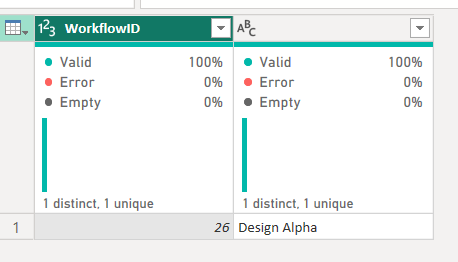


Hard Coded Query ResultHard Coded Query Result


When I try to use the parameter value in the query


Set @WorkflowName = '" & Workflow_Names & "'


instead of 'Design Alpha' then the parameter value which is passed through is as shown
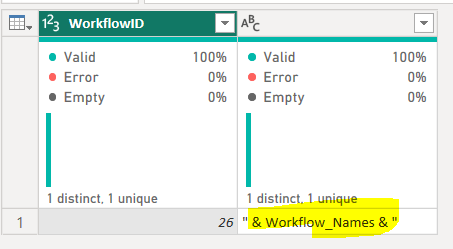
 

Parameter Value when used in query.PNG

I'd expected the Yellow Value to be 'Design Alpha' as this is what the current Parameter Value is


Parameter definition.PNG

However the query doesn't work as the & Workflow Names & is passed through as the value instead of the expected 'Design Alpha'


I've used Parameter values without any issue in the past but they have always been numeric values so am wondering if i'm going wrong with my TSQL syntax.

Hopefully i've made a typo or something silly but i've gone snow blind looking at it.


Can anyone advise how I can successfully pass in the dynamic parameter ?


Thanks,

Richard

1 ACCEPTED SOLUTION
RichardJ
Responsive Resident
Responsive Resident

Thanks for the response @lbendlin - I managed to figure it out.

let
    Source = Sql.Database(Server_Name, Database_Name, [Query="
    
   SELECT
   Workflows.Name as 'Workflow Name',
   Workflows.Description as 'Workflow Description',
   Workflows.InitialTransitionID as 'Workflow TransitionID',
   Status.Name as 'Workflow Status Name'

   FROM Workflows 

   Left Outer Join Status on Status.WorkflowID = Workflows.WorkflowID   
   
   Where Workflows.Name = '" & Workflow_Choice & "' and Status.Name = 'Work In Progress'
   

"])
in
    Source

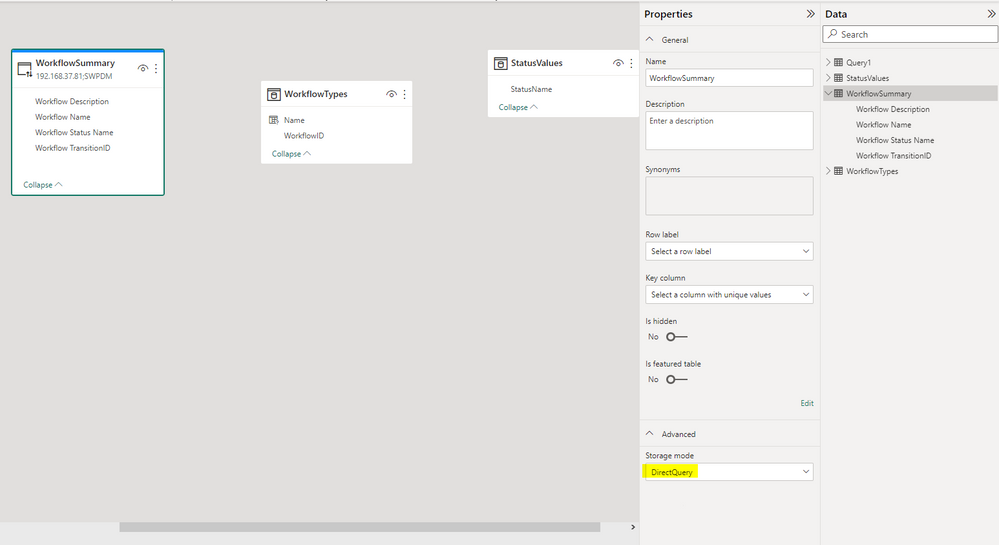
I'd mistakenly set the storage mode of the table to Import when it should have been DirectQuery for the parameter to populate ok.


DirectQuery.PNG

Appreciate you responding to the question.

Thanks,

Richard

View solution in original post

2 REPLIES 2
lbendlin
Super User
Super User

Please show more of the Power Query code.  Your example is missing the beginning and end of the query string.

RichardJ
Responsive Resident
Responsive Resident

Thanks for the response @lbendlin - I managed to figure it out.

let
    Source = Sql.Database(Server_Name, Database_Name, [Query="
    
   SELECT
   Workflows.Name as 'Workflow Name',
   Workflows.Description as 'Workflow Description',
   Workflows.InitialTransitionID as 'Workflow TransitionID',
   Status.Name as 'Workflow Status Name'

   FROM Workflows 

   Left Outer Join Status on Status.WorkflowID = Workflows.WorkflowID   
   
   Where Workflows.Name = '" & Workflow_Choice & "' and Status.Name = 'Work In Progress'
   

"])
in
    Source

I'd mistakenly set the storage mode of the table to Import when it should have been DirectQuery for the parameter to populate ok.


DirectQuery.PNG

Appreciate you responding to the question.

Thanks,

Richard

Helpful resources

Announcements
Power BI DataViz World Championships

Power BI Dataviz World Championships

The Power BI Data Visualization World Championships is back! Get ahead of the game and start preparing now!

December 2025 Power BI Update Carousel

Power BI Monthly Update - December 2025

Check out the December 2025 Power BI Holiday Recap!

FabCon Atlanta 2026 carousel

FabCon Atlanta 2026

Join us at FabCon Atlanta, March 16-20, for the ultimate Fabric, Power BI, AI and SQL community-led event. Save $200 with code FABCOMM.

Top Solution Authors