cancel
Showing results for 
Search instead for 
Did you mean: 

Join the FabCon + SQLCon recap series. Up next: Power BI, Real-Time Intelligence, IQ and AI, and Data Factory take center stage. All sessions are available on-demand after the live show. Register now

Reply
karan1214
Frequent Visitor

Help with Scatter plot

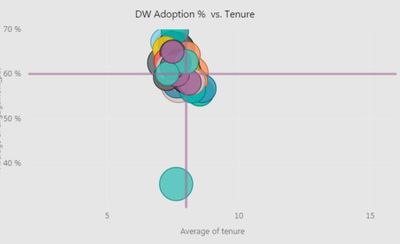
How do I get the dividing lines in the Scatter Plot?How do I get the dividing lines in the Scatter Plot?

1 ACCEPTED SOLUTION
deldersveld
Resident Rockstar
Resident Rockstar

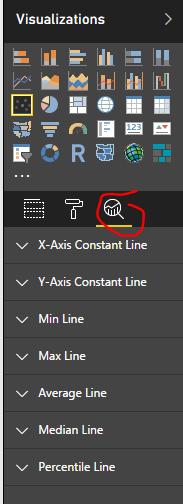
Use the "Analytics" functionality by clicking on the magnifying glass icon. There are a few different options there for line types.

PBI.PNG


View solution in original post

2 REPLIES 2
deldersveld
Resident Rockstar
Resident Rockstar

Use the "Analytics" functionality by clicking on the magnifying glass icon. There are a few different options there for line types.

PBI.PNG


Alright .. got it .. thanks a lot

Helpful resources

Announcements
April Power BI Update Carousel

Power BI Monthly Update - April 2026

Check out the April 2026 Power BI update to learn about new features.

New to Fabric survey Carousel

New to Fabric Survey

If you have recently started exploring Fabric, we'd love to hear how it's going. Your feedback can help with product improvements.

Power BI DataViz World Championships carousel

Power BI DataViz World Championships - June 2026

A new Power BI DataViz World Championship is coming this June! Don't miss out on submitting your entry.

FabCon and SQLCon Highlights Carousel

FabCon &SQLCon Highlights

Experience the highlights from FabCon & SQLCon, available live and on-demand starting April 14th.