cancel
Showing results for 
Search instead for 
Did you mean: 

The Power BI Data Visualization World Championships is back! It's time to submit your entry. Live now!

Reply
gabrielvigo
Helper I
Helper I

Help with Sankey Graphics

Hi everyone.


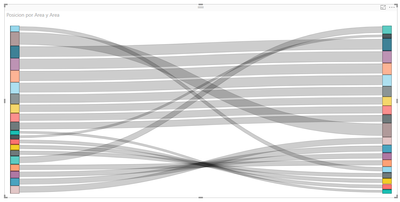
I need your help with this graphics.


Screenshot_1.png


In this case the origin and the destination are the same.

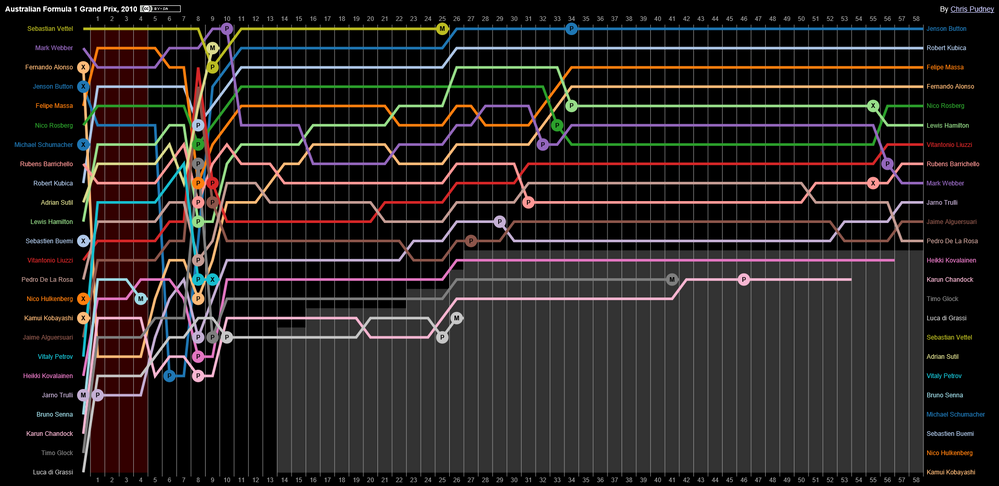
But, I need to add one more axis, the month of the year.
Throughout the month each value of the origin and destination is obtaining a different position.


In short, I need to come up with something like this:

Screenshot_2.png


2 REPLIES 2
Anonymous
Not applicable

Hi @gabrielvigo,


I don't think it is possible to achieve your requirement based on sankey visual. I'd like to suggest you R script to direct draw these graph on R visual chart.


You can also contact to power bi custom visual team for this if they have any better suggestions.


Regards,

Xiaoxin Sheng

Thanks!


Unfortunately, never use R Script.
I'm going to look for some other solution.

Helpful resources

Announcements
Power BI DataViz World Championships

Power BI Dataviz World Championships

The Power BI Data Visualization World Championships is back! It's time to submit your entry.

January Power BI Update Carousel

Power BI Monthly Update - January 2026

Check out the January 2026 Power BI update to learn about new features.

FabCon Atlanta 2026 carousel

FabCon Atlanta 2026

Join us at FabCon Atlanta, March 16-20, for the ultimate Fabric, Power BI, AI and SQL community-led event. Save $200 with code FABCOMM.