Join us at FabCon Atlanta from March 16 - 20, 2026, for the ultimate Fabric, Power BI, AI and SQL community-led event. Save $200 with code FABCOMM.
Register now!Learn from the best! Meet the four finalists headed to the FINALS of the Power BI Dataviz World Championships! Register now
I've reviewed several posts and this seems mostly the same as Solved: Re: DAX Question: Running Totals with Missing Valu... - Microsoft Fabric Community, but I can't seem to understand the formula well enough to adapt it.
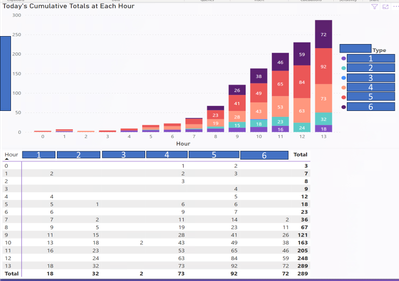
Basically I have a running total of orders in each hour. It's in a single table (query result) that groups the results per hour and some other dimensions (obfuscated here but we can just say order type).
This is the same data as Stacked Bar and as matrix for comparison.
Notice the purple category (type 1) is present in hour 1 but missing from hours 2 and 3? But then it appears again in 4.
I want the running total to repeat the same total if it is unchanged, so that the chart only grows.
Basically the way Excel pivot chart would do it.
I don't really want to use a calendar table because then I'll need a literal table of every hour and that seems weird. Can I just modify the formula as Solved: Re: DAX Question: Running Totals with Missing Valu... - Microsoft Fabric Community did, perhaps by using unique order type from the same table?
@CmdrKeene , have separate hour column and hour table and have measure like
Cumm Hour= CALCULATE(SUM(Sales[Amount]),filter(all('Hour'),'Hour'[Hour] <=max('Hour'[Hour])))
Cumm Based on Hour= CALCULATE(SUM(Sales[Amount]), Window(1,ABS,0,REL, ALL('Hour'[Hour]),ORDERBY('Hour'[Hour],ASC)))
or you try cumulative with window with partition by
Continue to explore Power BI Window function Rolling, Cumulative/Running Total, WTD, MTD, QTD, YTD, FYTD: https://youtu.be/nxc_IWl-tTc
https://medium.com/@amitchandak/power-bi-window-function-3d98a5b0e07f
Share feedback directly with Fabric product managers, participate in targeted research studies and influence the Fabric roadmap.
Check out the February 2026 Power BI update to learn about new features.
| User | Count |
|---|---|
| 54 | |
| 51 | |
| 39 | |
| 15 | |
| 14 |
| User | Count |
|---|---|
| 93 | |
| 79 | |
| 37 | |
| 27 | |
| 25 |