Join us at FabCon Atlanta from March 16 - 20, 2026, for the ultimate Fabric, Power BI, AI and SQL community-led event. Save $200 with code FABCOMM.
Register now!Learn from the best! Meet the four finalists headed to the FINALS of the Power BI Dataviz World Championships! Register now
Hi,
I am trying to use the formula Related( ) with the next formula:
Horas Unidad = CALCULATE(SUM(Zon1[Horas Unidad]);FILTER(Zon1;Zon1[Unidad de Bombeo Indisponible]=RELATED(SBH_1[Unidad])))
But it show the next error message:
"La columna 'SBH_1[Unidad]' no existe o no tiene ninguna relación con las tablas disponibles en el contexto actual."
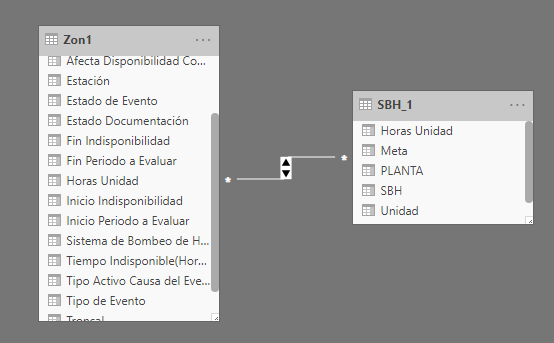
And the relationships I have are the following:
I know the error is with the formula Related( ).
Any idea to solve this problem?
Thanks!!
@Anonymous
This is a typical many to many relationship case, you should take a look at this post:
https://community.powerbi.com/t5/Desktop/DAX-RELATED-with-MANY-TO-MANY-RELATIONSHIP/td-p/606638
And if you need more help, could you provide a sample pbix that illustrates your problem.
Best regard
Paul Zheng
Hi @Anonymous
Can you provide more details on the format of the two tables and what is the current relationship between the two tables? Any reason you use many-to-many relationship here? (This is not recommended).
hey @DataChant @az38
Every row has his respective "Unidad de bombeo indisponible" and "Horas unidad"(these are hours). And sometimes the "Unidad de bombeo indisponible" can repeat in a different row with a different value of "Horas unidad". (This is in the "Zon1" table)
What I want is a calulated column in "SBH_1" table with the sum of "Horas unidad" from each "Unidad de bombeo indisponible".
The "unidad" column from SBH_1 has the same values of "Unidad de bombeo indisponible" with some repeated values I need.
So I create:
Horas Unidad = CALCULATE(SUM(Zon1[Horas Unidad]);FILTER(Zon1;Zon1[Unidad de Bombeo Indisponible]=RELATED(SBH_1[Unidad])))
The tables has a many to many relationship because I relate the tables with "unidad" and "Unidad de bombeo indisponible" and none of these has unique values.
Thanks
@Anonymous
didnt you try to add into SBH_1 table a super-simple measure?
Measure = calculate(SUM(Zon1[Horas Unidad]))
Hey,
No, because in the "Unidad" column are some repeated values than I related, and I need to sum other values too.
@Anonymous
what column do you use as a key for relationships?
Hi @Anonymous
what do you want to get at final?
sum of [Horas Unidad] from what table? as i see is a many-to-many relationship. what rule defines how to exactly it should be calculated? what table do you create a column in?
Share feedback directly with Fabric product managers, participate in targeted research studies and influence the Fabric roadmap.
Check out the February 2026 Power BI update to learn about new features.
| User | Count |
|---|---|
| 52 | |
| 50 | |
| 34 | |
| 15 | |
| 14 |
| User | Count |
|---|---|
| 94 | |
| 77 | |
| 41 | |
| 26 | |
| 25 |