cancel
Showing results for 
Search instead for 
Did you mean: 

The Power BI Data Visualization World Championships is back! Get ahead of the game and start preparing now! Learn more

Reply
ghdunn
Helper III
Helper III

Help with OData Microsoft Graph data from Planner

I don't really know whether this is a question for PBI, Planner or Graph.


I am trying to bring back data from a Microsoft Planner plan using


= OData.Feed("https://graph.microsoft.com/v1.0/planner/plans/{plan-id}", null, [Implementation="2.0"])


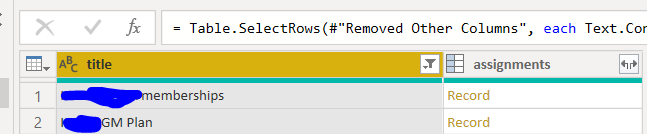
Unfortunately, when I expand out the assignments fields it takes me out of a tabular presentation.  Is it possible to generate a tabular output which includes all of the assignee data?


Many thanks


Ged


Screenprints:

1.PNG2.PNG3.PNG

1 REPLY 1
Anonymous
Not applicable

Hi @ghdunn ,


Unfortunately, we still need to connect Planner to Power BI by third party tools, like Excel, SharePoint list and etc.. You could vote up the idea : Load data from Office 365 Planner to PowerBI to make Power BI better. 


Here are some blogs about how to implement the requirement by SharePoint list.  Maybe it will help you get all the data.

Use Flow to push the data from Planner into SharePoint lists  

Microsoft Planner and Power BI - Better Together 


Best Regards,

Jay

Community Support Team _ Jay Wang

If this post helps, then please consider Accept it as the solution to help the other members find it more quickly.

Helpful resources

Announcements
Power BI DataViz World Championships

Power BI Dataviz World Championships

The Power BI Data Visualization World Championships is back! Get ahead of the game and start preparing now!

December 2025 Power BI Update Carousel

Power BI Monthly Update - December 2025

Check out the December 2025 Power BI Holiday Recap!

FabCon Atlanta 2026 carousel

FabCon Atlanta 2026

Join us at FabCon Atlanta, March 16-20, for the ultimate Fabric, Power BI, AI and SQL community-led event. Save $200 with code FABCOMM.