Hi All,
I'm having issues visualising data in the way I need it. I'm new to Power BI.
I have 3 data tables:
Master Data: (Material Number / Product Hierarchy)
- Hierarchy Mapping: (Product Hierarchy / Grouping)
- Sales (Material Number / Month / Net Revenue / Business Margin / KG)
Relationships are:
- One to Many ('Master Data'[Material Number] to 'Sales'[Material Number]).
- Many to One ('Master Data'[Product Hierarchy] to 'Hierarchy Mapping'[Product Hierarchy]
I want to be able to:
1. Show, by product grouping, the number of products with NO sales / Negative sales for a given month.
2. Show, by product grouping, the number of products which make up X% of the overall total for that group for a given month. For example, the number of products (from smallest to largest revenue) that make up the bottom 5% of revenue for the group, or the number of products that make up the bottom 15% of revene for the group etc.
Sample of data for the three sets below.
In a previous forum I was advised to create the following three measures. The first of which is working fine, but the second measure is is causing some issues. It's only counting the Products that appear on the Sales Data Table for a given month that have 'blank' revenue. I'm also looking for, in this measure, the count of the products on the 'Master Data' tab that do not appear on the sales data table at all for a given month, and those with a negative revenue for the month.
The third measure was provided to give me the count of the products which make up the bottom 5% of ther overall revenue for a product grouping for a given month, but it's also proving tricky.
I'm very new to PowerBI and DAX - hoping some experienced brains out there can help me!
Total Sales := SUM( Sales[Net Revenue] )
Count of Products With No Sales :=
    /* per month and per hierarchy (category) */
VAR countOfProducts =
    SUMX(
        VALUES( 'Master Data'[Material Number] )
        , IF( ISBLANK([Total Sales]), 1, 0 )
        )
RETURN
    countOfProducts
Count of Products in Bottom 5% :=
    /* per month and per hierarchy (category) */

VAR threshold = 0.05

VAR monthlyHierarchyTotalSales = [Total Sales]

VAR amountThreshold = monthlyHierarchyTotalSales * threshold

VAR countOfProducts =
    SUMX(
        VALUES('Master Data'[Material Number])
        ,
            VAR thisProductSales = [Total Sales]
            VAR lesserProductsSales =
                SUMX(
                    VALUES('Master Data'[Material Number])
                    ,
                        VAR eachProductSales = [Total Sales]
                        RETURN
                            IF( eachProductSales < thisProductSales
                                , eachProductSales
                                , 0
                                )
                    )
            VAR runningSales = lesserProductsSales + thisProductSales
            RETURN
                IF( ISBLANK(thisProductSales)
                    , 0
                    , IF( runningSales > amountThreshold, 0, 1 )
                    )
        )

RETURN
    countOfProducts
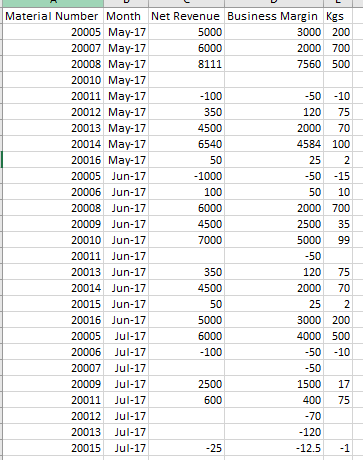 Sales Data
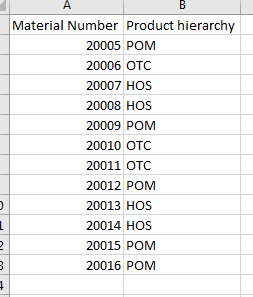 Master Data
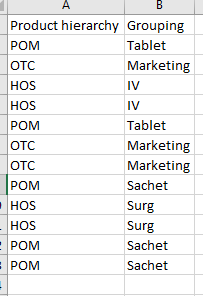 Hierarchy mapping


