cancel
Showing results for 
Search instead for 
Did you mean: 

July 7 - July 17 | Round 2 of the Power BI Dataviz World Championships. Don't miss your chance! Learn more

Reply
vjnvinod
Impactful Individual

Help with Measure

Dear all,

@Anonymous 

i was attempting to tweak a meaure to get some desired result

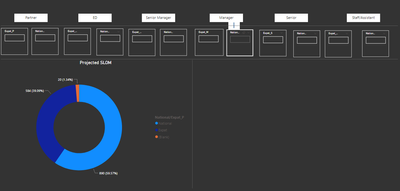
as you see below, the boxes i have used to create enter values, however when i am entering the the Donut chart is not updating or summing it up.


is there a way to fix that?

here is my sample pbix

https://drive.google.com/file/d/1IlwR9wQJqQIQ0o2P5hsnouhEWS_StDdz/view?usp=sharing


Capture.PNG


1 ACCEPTED SOLUTION
Anonymous
Not applicable

Create another measure as follows for this kind of visuals that have multiple values for Expat/National like "Manager", "Director" and so on .... (But don't delete the current measure. You will need it for other scenarios)


FY21 Scenario Closing Projection HC Expat_National V2 = 
VAR __raw = [Latest HC] + [Preboarding Pipeline] + [Additional approved Exp Hire] + [Additional Approved Graduate] - [Confirmed Exists] - [Exit Pipeline]
VAR SumExpatValues = [Expat_ED Value]+[Expat_M Value]+[Expat_P Value]+[Expat_S Value]+[Expat_S/A Value]+[Expat_SM Value]
VAR SumNationalValues = [National_ED Value]+[National_M Value]+[National_P Value]+[National_S Value]+[National_S/A Value]+[National_SM Value]
VAR X =
    SELECTEDVALUE ( Nationality[National/Expat_P] )
RETURN
    SWITCH (
        SELECTEDVALUE ( Nationality[National/Expat_P] ),
        "Expat", SumExpatValues,
        "National", SumNationalValues
) + __raw


View solution in original post

3 REPLIES 3
Anonymous
Not applicable

Create another measure as follows for this kind of visuals that have multiple values for Expat/National like "Manager", "Director" and so on .... (But don't delete the current measure. You will need it for other scenarios)


FY21 Scenario Closing Projection HC Expat_National V2 = 
VAR __raw = [Latest HC] + [Preboarding Pipeline] + [Additional approved Exp Hire] + [Additional Approved Graduate] - [Confirmed Exists] - [Exit Pipeline]
VAR SumExpatValues = [Expat_ED Value]+[Expat_M Value]+[Expat_P Value]+[Expat_S Value]+[Expat_S/A Value]+[Expat_SM Value]
VAR SumNationalValues = [National_ED Value]+[National_M Value]+[National_P Value]+[National_S Value]+[National_S/A Value]+[National_SM Value]
VAR X =
    SELECTEDVALUE ( Nationality[National/Expat_P] )
RETURN
    SWITCH (
        SELECTEDVALUE ( Nationality[National/Expat_P] ),
        "Expat", SumExpatValues,
        "National", SumNationalValues
) + __raw


vjnvinod
Impactful Individual

@Anonymous 


i noticed that above measure will not work for "Card visual"

is there anyway to fix that?

vjnvinod
Impactful Individual

@Anonymous 

Worked like charm, its so helpful, i took whole day figuring this out.

thanks so much

Helpful resources

Announcements
FabCon and SQLCon Barcelona 2026

FabCon & SQLCon – Barcelona 2026

Join us in Barcelona for FabCon and SQLCon, the Fabric, Power BI, SQL, and AI community event. Save €200 with code FABCMTY200.

60 days of Data Days Carousel

Data Days 2026

Join Data Days 2026: 60 days of free live/on-demand sessions, challenges, study groups, and certification opportunities.

Power BI DataViz World Championships carousel

Power BI DataViz World Championships - June 2026

A new Power BI DataViz World Championship is coming this June! Don't miss out on submitting your entry.

Top Solution Authors