This is best Fabric, Power BI, SQL and AI community event. How do we know? The last event sold out! Save €200 with code FABCMTY200.
Register nowA new Data Days event is coming soon! This time we’re going bigger than ever. Fabric, Power BI, SQL, AI and more. Don't miss out.
Dear all,
@Anonymous
i was attempting to tweak a meaure to get some desired result
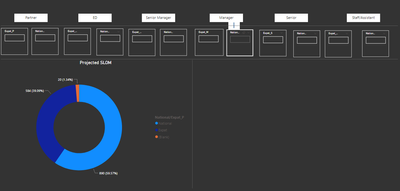
as you see below, the boxes i have used to create enter values, however when i am entering the the Donut chart is not updating or summing it up.
is there a way to fix that?
here is my sample pbix
https://drive.google.com/file/d/1IlwR9wQJqQIQ0o2P5hsnouhEWS_StDdz/view?usp=sharing
Solved! Go to Solution.
Create another measure as follows for this kind of visuals that have multiple values for Expat/National like "Manager", "Director" and so on .... (But don't delete the current measure. You will need it for other scenarios)
FY21 Scenario Closing Projection HC Expat_National V2 =
VAR __raw = [Latest HC] + [Preboarding Pipeline] + [Additional approved Exp Hire] + [Additional Approved Graduate] - [Confirmed Exists] - [Exit Pipeline]
VAR SumExpatValues = [Expat_ED Value]+[Expat_M Value]+[Expat_P Value]+[Expat_S Value]+[Expat_S/A Value]+[Expat_SM Value]
VAR SumNationalValues = [National_ED Value]+[National_M Value]+[National_P Value]+[National_S Value]+[National_S/A Value]+[National_SM Value]
VAR X =
SELECTEDVALUE ( Nationality[National/Expat_P] )
RETURN
SWITCH (
SELECTEDVALUE ( Nationality[National/Expat_P] ),
"Expat", SumExpatValues,
"National", SumNationalValues
) + __raw
Create another measure as follows for this kind of visuals that have multiple values for Expat/National like "Manager", "Director" and so on .... (But don't delete the current measure. You will need it for other scenarios)
FY21 Scenario Closing Projection HC Expat_National V2 =
VAR __raw = [Latest HC] + [Preboarding Pipeline] + [Additional approved Exp Hire] + [Additional Approved Graduate] - [Confirmed Exists] - [Exit Pipeline]
VAR SumExpatValues = [Expat_ED Value]+[Expat_M Value]+[Expat_P Value]+[Expat_S Value]+[Expat_S/A Value]+[Expat_SM Value]
VAR SumNationalValues = [National_ED Value]+[National_M Value]+[National_P Value]+[National_S Value]+[National_S/A Value]+[National_SM Value]
VAR X =
SELECTEDVALUE ( Nationality[National/Expat_P] )
RETURN
SWITCH (
SELECTEDVALUE ( Nationality[National/Expat_P] ),
"Expat", SumExpatValues,
"National", SumNationalValues
) + __raw
@Anonymous
i noticed that above measure will not work for "Card visual"
is there anyway to fix that?
@Anonymous
Worked like charm, its so helpful, i took whole day figuring this out.
thanks so much
Check out the May 2026 Power BI update to learn about new features.
Sign up to receive a private message when registration opens and key events begin.
If you have recently started exploring Fabric, we'd love to hear how it's going. Your feedback can help with product improvements.
| User | Count |
|---|---|
| 31 | |
| 26 | |
| 23 | |
| 22 | |
| 15 |
| User | Count |
|---|---|
| 63 | |
| 45 | |
| 28 | |
| 24 | |
| 22 |