We've captured the moments from FabCon & SQLCon that everyone is talking about, and we are bringing them to the community, live and on-demand. Starts on April 14th. Register now
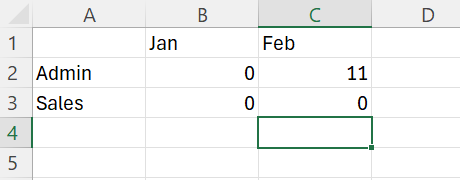
I would like my matrix to look like the below in Power BI:
Below is my current DAX code:
Admin =
VAR StartDate =
CALCULATE(
STARTOFYEAR('DimDate'[Date]),
DimDate[Date] = EDATE(TODAY(),-1)
)
VAR EndDate =
CALCULATE(
ENDOFMONTH(DimDate[Date]),
DimDate[Date] = EDATE(TODAY(),-1)
)
RETURN
CALCULATE(
COUNT('Training'[#]),
'Training'[Department] = "Admin",
KEEPFILTERS(DimDate[Date] >= StartDate),
KEEPFILTERS(DimDate[Date] <= EndDate)
)
The problem with above is zeros do not show in the date range specified, also when I add coalesce(query,0) then zeros are added to every month row, I would only like months jan, feb to show as the current month checks are incomplete, don't want future months to show either, and my date table is from januaury to December 2024.
Solved! Go to Solution.
Hi @akhaliq7
You can add a relative date filter or a relative date slicer to show last 2 months.
Create a relative date slicer or filter in Power BI - Power BI | Microsoft Learn
Or try a measure like
Measure =
IF (
MONTH ( MAX ( DimDate[Date] ) ) < MONTH ( TODAY () ),
COALESCE ( [your measure], 0 ),
BLANK ()
)
BTW, it seems you are computing something like YTD, you may try something simpler for the measure
CALCULATE (
[measure],
DATESYTD ( 'Date'[Date] )
)
Best Regards,
Jing
If this post helps, please Accept it as Solution to help other members find it. Appreciate your Kudos!
Hi @akhaliq7
You can add a relative date filter or a relative date slicer to show last 2 months.
Create a relative date slicer or filter in Power BI - Power BI | Microsoft Learn
Or try a measure like
Measure =
IF (
MONTH ( MAX ( DimDate[Date] ) ) < MONTH ( TODAY () ),
COALESCE ( [your measure], 0 ),
BLANK ()
)
BTW, it seems you are computing something like YTD, you may try something simpler for the measure
CALCULATE (
[measure],
DATESYTD ( 'Date'[Date] )
)
Best Regards,
Jing
If this post helps, please Accept it as Solution to help other members find it. Appreciate your Kudos!
Thanks for your help. I used the relative date filter and will try out the measures later.
If you have recently started exploring Fabric, we'd love to hear how it's going. Your feedback can help with product improvements.
A new Power BI DataViz World Championship is coming this June! Don't miss out on submitting your entry.
Share feedback directly with Fabric product managers, participate in targeted research studies and influence the Fabric roadmap.
| User | Count |
|---|---|
| 53 | |
| 38 | |
| 33 | |
| 17 | |
| 17 |
| User | Count |
|---|---|
| 67 | |
| 62 | |
| 38 | |
| 34 | |
| 22 |